Stripe Subscription Webhooks: The 6 Events That Actually Matter for Revenue Recovery
Stripe fires dozens of subscription webhook events. These six are the ones that drive revenue recovery, plus what to actually do in each handler.
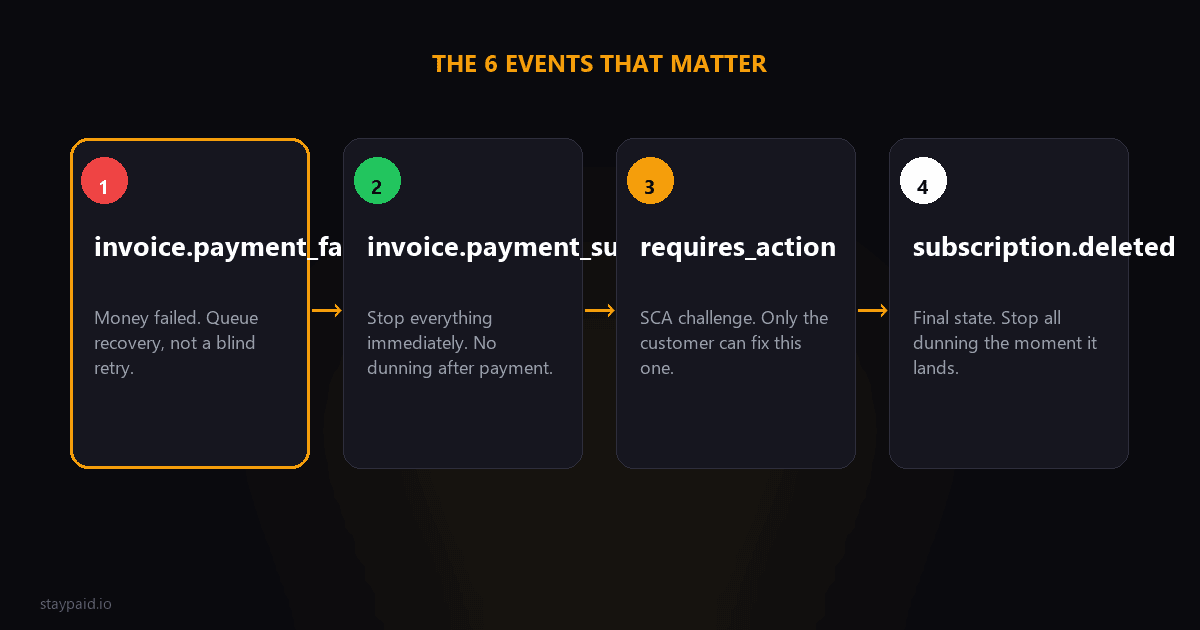
You don't need every event. You need six.
Stripe fires dozens of subscription-related webhook events, but revenue recovery runs on six of them: invoice.payment_failed, invoice.payment_succeeded, invoice.upcoming, customer.subscription.updated, customer.subscription.deleted, and payment_intent.requires_action (surfaced through the invoice). Wire these six properly and you have a complete picture of every dollar at risk.
I've seen founders subscribe to every event in the dashboard, log them all, and act on none of them. That's not a webhook strategy, that's a firehose into a void. Here's the map I wish someone had given me.
1. invoice.payment_failed — your dunning trigger
This is the big one. A renewal charge failed, and the clock just started. The payload tells you the amount due, which attempt number this is (attempt_count), the customer, and the subscription it belongs to.
What to do in the handler:
- •Check attempt_count. First failure means start the recovery sequence. Fourth failure means this customer is deep in the funnel and needs a different tone.
- •Pull the amount. A failed $500 invoice deserves a personal email today. A failed $9 invoice can wait for the automated sequence.
- •Look up the decline reason on the latest charge. Soft decline means retries might fix it. Hard decline means only the customer can fix it, so email is the whole play.
- •Write a record somewhere: customer, amount, date, decline code. This becomes your dunning queue.
If you only ever wire one webhook, it's this one. There's a full deep dive on it in our invoice.payment_failed guide, so I won't repeat the details here.
2. invoice.payment_succeeded — the resolution signal
Nobody celebrates this event enough. When a payment succeeds after a failure, this event is how you know to stop dunning the customer. Missing it means emailing someone to update their card the day after they already did. Nothing screams 'robot' louder.
- •On receipt, check if this customer has an open dunning case. If yes, close it immediately.
- •Suppress any queued recovery emails for this customer before they send.
- •If the recovery was a hard one (multiple failures, personal emails), a short 'you're all set, thanks for sorting that' note from the founder earns real goodwill.
3. invoice.upcoming — the pre-dunning window
Stripe fires this about a week before a renewal invoice is finalized (the exact timing depends on your settings). It's your early warning system: the customer's card on file might be expired, expired-by-renewal-date, or otherwise stale, and you can check before the charge even runs.
The play: when invoice.upcoming arrives, look at the customer's default payment method. If the card expires this month or next, send a friendly heads-up email. 'Your card ending in 4242 expires soon, want to update it before your renewal?' This one email kills a whole category of failed payments before they exist. That's pre-dunning, and it's the cheapest recovery you'll ever do.
4. customer.subscription.updated — the quiet informer
This event fires on plan changes, cancellations scheduled at period end, pause/resume, and status transitions. For recovery purposes, two things matter:
- •cancel_at_period_end flipping to true: the customer is leaving voluntarily. That's a different conversation than dunning, and ideally a different email.
- •status changes (active to past_due, past_due to unpaid): these tell you where Stripe thinks the subscription stands, which drives your own access-control decisions.
Watch out for noise: subscription.updated fires a lot. Filter inside the handler for the specific fields you care about instead of reacting to every payload.
5. customer.subscription.deleted — the final word
The subscription is over. Stripe cancelled it (after your configured retry schedule gave up) or the customer cancelled outright. Either way:
- •Revoke or downgrade access now, not eventually. Past-due customers keeping full access for weeks is money leaking.
- •Move the customer to your win-back list. They wanted your product once.
- •Record the churn with the reason you know: failed payment vs deliberate cancel. Your churn math depends on telling these apart.
What about all the other events?
Stripe will happily send you charge.failed, payment_method.updated, customer.updated, setup_intent.succeeded, and a dozen more. Most of them are redundant for recovery purposes: charge.failed and invoice.payment_failed describe the same failure from different angles, and picking both means double-counting your dunning queue. Pick the invoice-level events as your source of truth and let the rest be logs.
The one exception worth knowing: customer.updated tells you when a card on file changes, which is how you notice that a customer in dunning quietly fixed their own card. Pair that with a retry and you recover accounts without sending a single additional email — some of your easiest saves are customers who self-fixed and just needed the charge attempted again.
The requires_action case (the SCA trap)
Sometimes a renewal doesn't fail cleanly. It goes into limbo: the charge needs the customer to complete 3D Secure authentication, and the PaymentIntent sits in requires_action. There's no customer staring at a screen at 3am, so nothing happens until they come back.
Watch invoice.payment_failed with a last_payment_error of type authentication_required, or listen for the PaymentIntent status directly. The recovery move is always the same: get a human to click something. An email with a direct link to complete the payment beats any retry schedule, because no retry can supply a thumbprint.
Delivery retries and idempotency (read this before you ship)
Two production truths about Stripe webhooks that bite everyone once:
- •Stripe retries delivery for up to roughly 3 days with exponential backoff until you return a 2xx. A buggy endpoint doesn't just miss events, it gets hammered with repeats.
- •The same event can arrive more than once, and events can arrive out of order. Make every handler idempotent: store processed event IDs, and before acting on state (like 'subscription is past_due'), fetch the current object from the API instead of trusting the payload's snapshot.
Out-of-order delivery is the subtle one. A payment_succeeded from yesterday can land after a payment_failed from today. If you key your logic off event timestamps without checking live state, you'll reopen closed cases and close open ones.
A minimal handler skeleton
Conceptually, your endpoint is a switch statement:
- •Verify the signature (never skip this).
- •Store the event ID, skip if already processed.
- •Switch on event type: the six above.
- •For anything involving money or access, fetch the current invoice or subscription from the API, then act.
- •Return 200 fast. Do the slow work (sending emails, updating records) in a background job.
Return 200 first, do work second. Stripe doesn't care that your email provider was slow — it cares about the response code, and it will retry anything that isn't a 2xx. A simple queue between receipt and processing turns a fragile endpoint into a boring one, and boring is the highest compliment a webhook pipeline can earn.
The takeaway
Six events, one queue, idempotent handlers, fast 200s. That's the entire webhook side of a dunning system. Everything else Stripe sends your endpoint is context, not signal.
And if wiring this up yourself sounds like a fun weekend but a bad use of one: this is literally what StayPaid does. We listen to these events for you, and when a payment fails, a recovery email goes out from your own address, with you able to approve each one. The plumbing should be boring. The recovery should be human.
The minimal set that covers a subscription lifecycle
- •customer.subscription.created: provision access.
- •customer.subscription.updated: plan changes, pause states, seat changes.
- •customer.subscription.deleted: revoke access, start win-back timing.
- •invoice.payment_succeeded: confirm the money landed, stop dunning.
- •invoice.payment_failed: start dunning immediately.
- •customer.subscription.trial_will_end: validate the card before the first real charge.
Six events cover roughly everything a subscription business needs to react to. The rest are useful for analytics, but these six are the ones that change what a customer can do or what money you collect. Build these well before you build anything else.
Why invoice events beat subscription events for money logic
Subscription events tell you the state of the agreement. Invoice events tell you the state of the money. A subscription can look active while its latest invoice has failed three times. If your access control reads subscription.status alone, customers with failed payments keep access until the subscription eventually flips to past_due or canceled. Listen to the invoice events and you react days earlier.
Whatever set you choose, sign everything. The signing secret guide and the verification failure guide cover the two ways that goes wrong, and the testing guide shows how to exercise all six events before a customer does it for you.
FAQ
Which Stripe webhook event fires when a subscription payment fails?
invoice.payment_failed. It fires when a renewal charge fails, and the payload includes the invoice amount, the attempt count, and the customer — everything you need to kick off a dunning sequence.
What is the difference between invoice.payment_failed and payment_intent.payment_failed?
payment_intent.payment_failed fires for any failed PaymentIntent, including one-off charges. invoice.payment_failed is specific to invoice-based billing like subscriptions. For dunning, listen to invoice.payment_failed — it carries the subscription context you need.
How many times does Stripe retry a webhook delivery?
Stripe retries webhook delivery for up to about 3 days with exponential backoff if your endpoint doesn't return a 2xx response. You should still make handlers idempotent, because the same event can arrive more than once.
Do I need to handle customer.subscription.deleted if I already handle payment failures?
Yes. payment_failed tells you a charge failed; subscription.deleted tells you the subscription is actually over. Those are different moments, often weeks apart, and mixing them up means either cancelling access too early or counting churned customers as active.
Keep reading
Robert
Founder at StayPaid
Want to recover failed payments like a founder?
Start Free — First 3 recoveries