The Stripe Webhook Signing Secret: What It Is, Where to Find It, and Why Skipping It Is Dangerous
What the Stripe webhook signing secret (whsec_) actually does, where to find it, and the production mistakes that make billing webhooks untrustworthy.
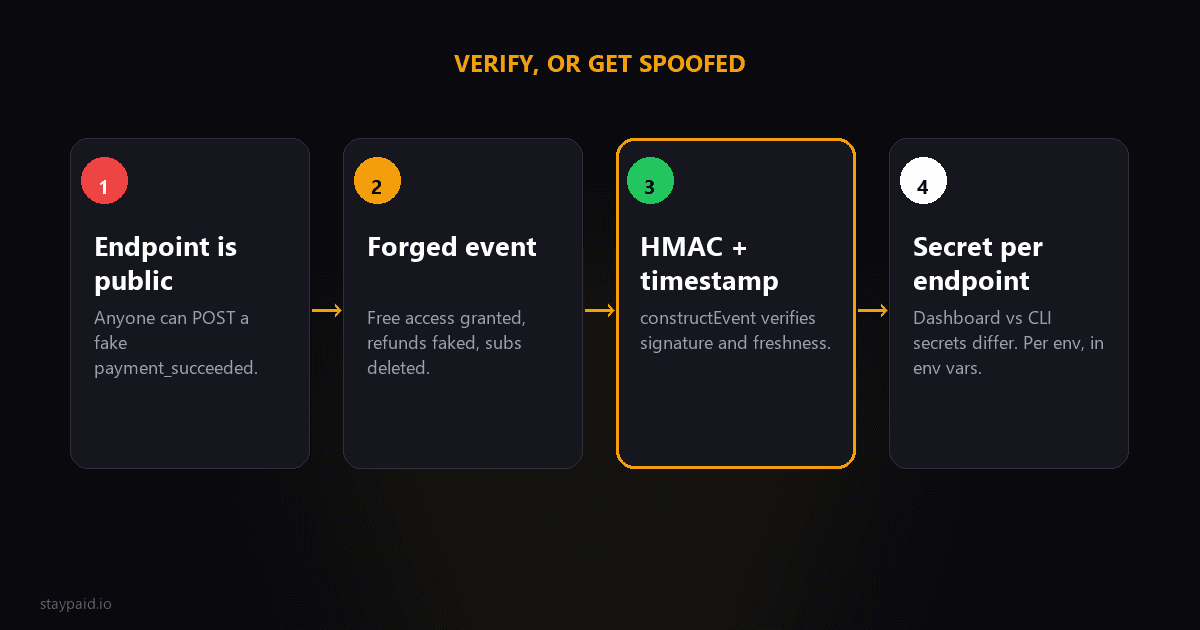
The 30-second answer
The webhook signing secret is a per-endpoint password (it starts with whsec_) that Stripe uses to cryptographically sign every event it sends you. Verifying that signature proves two things: the event really came from Stripe, and nobody tampered with it on the way. If you process webhooks without verifying, your billing logic will believe anything anyone posts to that URL.
Every Stripe webhook guide mentions the secret in step one and then moves on. But if you're building anything money-related on webhooks — dunning, access control, entitlement changes — the signature is the only thing standing between your system and a forged 'payment succeeded' event. Worth five minutes to understand properly.
What it actually is
When Stripe sends an event to your endpoint, it computes an HMAC-SHA256 signature over the request body, using your endpoint's signing secret as the key. That signature travels in the Stripe-Signature HTTP header, along with a timestamp.
Your server has the same secret. It recomputes the signature over the body it received and compares. Match means authentic. Mismatch means forged, corrupted, or misconfigured — and you drop the request.
The timestamp matters too: Stripe's libraries reject events older than a few minutes by default, which kills replay attacks where someone captures a legitimate event and resends it later.
Where to find it (and why you have more than one)
- •Dashboard: Developers, then Webhooks, then click your endpoint. The signing secret is listed there. Each endpoint you create gets its own secret.
- •Stripe CLI: when you run stripe listen, it prints a session-specific whsec_ for local testing. This is NOT the same secret as any dashboard endpoint.
- •Test mode vs live mode: secrets differ between them. A live event will never verify against a test-mode secret.
That last part trips people constantly. 'Works locally, fails in production' is usually a secret mismatch: the code is using the CLI's session secret or the test-mode secret while Stripe is signing with the live endpoint's secret.
What you're actually protecting against
Picture a dunning system that trusts unverified webhooks. Your endpoint URL is not really secret — it leaks into client-side code, logs, error reports, browser extensions. Now imagine someone with a grudge or a curiosity:
- •They POST a forged invoice.payment_succeeded for their own customer ID. Your system closes their dunning case, stops the recovery emails, and keeps their access alive without paying.
- •They forge customer.subscription.deleted for a competitor's biggest customer... on your books. You revoke access and email a confused, angry customer.
- •They replay a captured, once-legitimate event from weeks ago. Without timestamp tolerance, your system processes stale state as if it were current.
None of this requires elite skills. It's a POST request with a guessed body — the kind of thing a curious teenager with curl can produce in an afternoon. Signature verification is what makes it impossible, and it's free.
What verification looks like in practice
Every official Stripe library has a constructEvent (or equivalent) function that does the HMAC comparison and timestamp check for you. You hand it the raw body, the Stripe-Signature header, and your endpoint's secret; it hands you back a verified event object or throws. The whole security layer is one function call — the only genuinely hard part is making sure the body reaches that function unparsed.
If you're rolling your own verification instead of using the library: don't. HMAC comparison needs constant-time equality checking, the timestamp tolerance needs to handle clock skew, and the signed payload format has a specific shape (timestamp, then a dot, then the body). The libraries handle all of it, in every language Stripe supports. This is one of those rare cases where rolling your own crypto-adjacent code buys you nothing and risks everything.
The three production mistakes everyone makes once
- •Parsing the body before verifying. Stripe signs the exact bytes it sent. If your framework JSON-parses the body first (most do by default), re-serializing it changes whitespace and key order, and verification fails. Fix: give the webhook route the raw body. In Express that's express.raw for that route; in Next.js App Router, read the request text directly.
- •Using the wrong secret for the environment. CLI session secret in an env var that shipped to production, or the test-mode secret on the live endpoint. Fix: separate env vars per environment, and log a clear error on verification failure instead of a silent 400.
- •Verifying, but trusting the payload state anyway. Verification proves the event is from Stripe — it does not prove the invoice snapshot inside is still current. Events arrive late and out of order. For anything touching money or access, re-fetch the object from the API before acting.
A note on rolling and leaking secrets
Treat the signing secret like any credential. If it leaks — committed to a repo, pasted in a screenshot, shared in a screenshot of your .env — roll it. In the dashboard you can expire the old secret and generate a new one for the endpoint. Deploy the new secret, then expire the old one, in that order, so you don't drop real events in the gap.
And the CLI session secret from stripe listen: it expires with the session, but don't paste it anywhere durable. It's a development convenience, not infrastructure.
One more habit from the security-minded: don't echo the raw body or headers into your application logs by default. Webhook payloads contain customer emails, card brands, last4s, and invoice amounts. Log the event ID and type — that's enough to trace anything in the Stripe dashboard later, and it keeps your log aggregation service from becoming a shadow copy of your customer data.
Monitoring: the part that saves you at 2am
Signature failures in production are a signal, not noise. A sudden spike usually means one of two things: someone found your endpoint and is poking it, or you deployed with the wrong secret and every real event is now being rejected. Both deserve an alert. Log verification failures separately from handler errors, and page on a burst — a broken webhook endpoint is indistinguishable from a broken business when your dunning depends on it.
While you're at it, alert on silence too. If your endpoint normally processes hundreds of events a day and suddenly processes zero, the problem might not be your code at all — an expired endpoint, a DNS slip, a deploy that dropped the route. The absence of webhooks is itself a webhook problem.
The takeaway
The signing secret is a five-minute concept with outsized consequences: verify with the raw body, keep secrets per environment and per endpoint, and still re-fetch live state before you touch money or access. Do those three things and your webhook pipeline is trustworthy — you can build dunning, dunning sequences, access control, all of it, on a foundation you don't have to second-guess. Skip them and your system is taking instructions from strangers, and you'll find out the day a stranger decides to give some.
If you'd rather never think about whsec_ again, that's fair — StayPaid handles the whole webhook pipeline, verification included, and surfaces the only part that actually needs you: approving the recovery email that goes out under your name.
"No signatures found matching the expected signature for payload"
This is the error Stripe's official libraries throw when signature verification fails, and it is the most searched webhook error Stripe has. It means one thing only: the signature your server computed does not match the signature in the Stripe-Signature header. The event is usually legitimate. The verification setup is what is broken.
In production this error traces back to one of five causes, and they are listed here in the order they actually happen, not the order docs mention them.
- •Your framework parsed the body before verification. Signature verification needs the raw, untouched request body. If Express, Next.js, or any middleware ran the body through a JSON parser first, the bytes changed and the signature will never match. In Express the fix is express.raw on the webhook route. In Next.js App Router, read the body with request.text() before anything else touches it.
- •You are verifying against the wrong secret. Every endpoint gets its own whsec_ secret, and test-mode secrets differ from live-mode secrets. Create a second endpoint, forget to update the environment variable, and every event fails.
- •The CLI secret leaked into production config. When you test locally with stripe listen, the CLI prints a temporary session secret that only works for events the CLI forwards. Deploy that value to production and every real event fails verification.
- •A proxy or platform modified the request. Some hosts and serverless platforms buffer, compress, or re-encode request bodies. If events arrive through a proxy, compare the raw bytes it receives with what your function sees.
- •You signed the wrong payload. The signed payload is the timestamp, a dot, and the raw body concatenated together. Sign only the body and the check fails even with the correct secret.
A two-minute diagnosis before you change any code
Log three things on the next failing event: the Stripe-Signature header, the first 200 characters of the raw body exactly as received, and which secret your code loaded (log the prefix only, whsec_ plus four characters, never the full value). The mismatch is almost always visible in those three lines: a wrong secret prefix, a body that starts with a parsed object instead of raw JSON, or a signature header missing its timestamp component.
Test mode, live mode, and the CLI: three different secrets
Stripe maintains completely separate webhook configurations for test and live mode. An endpoint that exists in test mode does not exist in live mode, and its secret is different. The stripe listen CLI adds a third secret into the mix, valid only for the events that CLI session forwards.
The practical rule: treat the secret as part of your deployment config, not your codebase. Every environment gets its own endpoint and its own secret, and no secret crosses environments. Most 'worked yesterday, broken today' reports are a secret from one environment verifying events from another.
Rotating a signing secret without dropping events
If you suspect a secret leaked, rotate it from the dashboard. Stripe keeps the old secret valid for a grace period you choose, up to 24 hours, while the new one activates. Deploy the new secret to your servers first, then roll it in the dashboard, then let the old one expire. In that order, not a single event gets rejected during rotation.
If you are seeing signature failures alongside delivery retries, the retry behavior has its own rules worth knowing; see our guide on Stripe webhook retry logic. For deliberately breaking your endpoint in a controlled way, the testing guide covers the tools.
FAQ
Where do I find my Stripe webhook signing secret?
In the Stripe dashboard under Developers, then Webhooks. Click your endpoint and the signing secret (starting with whsec_) is shown there. When testing locally with the Stripe CLI, the listen command prints a separate session secret to use instead.
Is the webhook signing secret the same as my Stripe API key?
No. API keys authenticate your requests to Stripe. The signing secret verifies Stripe's requests to you. They're different credentials with different jobs, and each webhook endpoint has its own signing secret.
What happens if I don't verify webhook signatures?
Anyone who discovers your endpoint URL can POST fake events to it — like a forged invoice.payment_succeeded that tricks your system into giving away access or cancelling a real dunning sequence. Signature verification is what makes webhook data trustworthy.
Why does signature verification fail even with the right secret?
The most common cause is your framework parsing the request body before verification. Stripe signs the raw request body, so you must verify against the unparsed bytes, not a re-serialized JSON object.
What does 'No signatures found matching the expected signature for payload' mean?
Stripe's library could not match the signature it computed with the one in the Stripe-Signature header. The usual causes are a parsed (non-raw) request body, the wrong endpoint secret, a test-mode or CLI secret in production, or a proxy modifying the body. The event itself is usually fine; the verification setup is broken.
Keep reading
Robert
Founder at StayPaid
Want to recover failed payments like a founder?
Start Free — First 3 recoveries