invoice.payment_failed: A Founder's Guide to Stripe's Failed Payment Webhook
When invoice.payment_failed fires, what the payload carries, and the handler that starts dunning without spamming customers. Edge cases included.
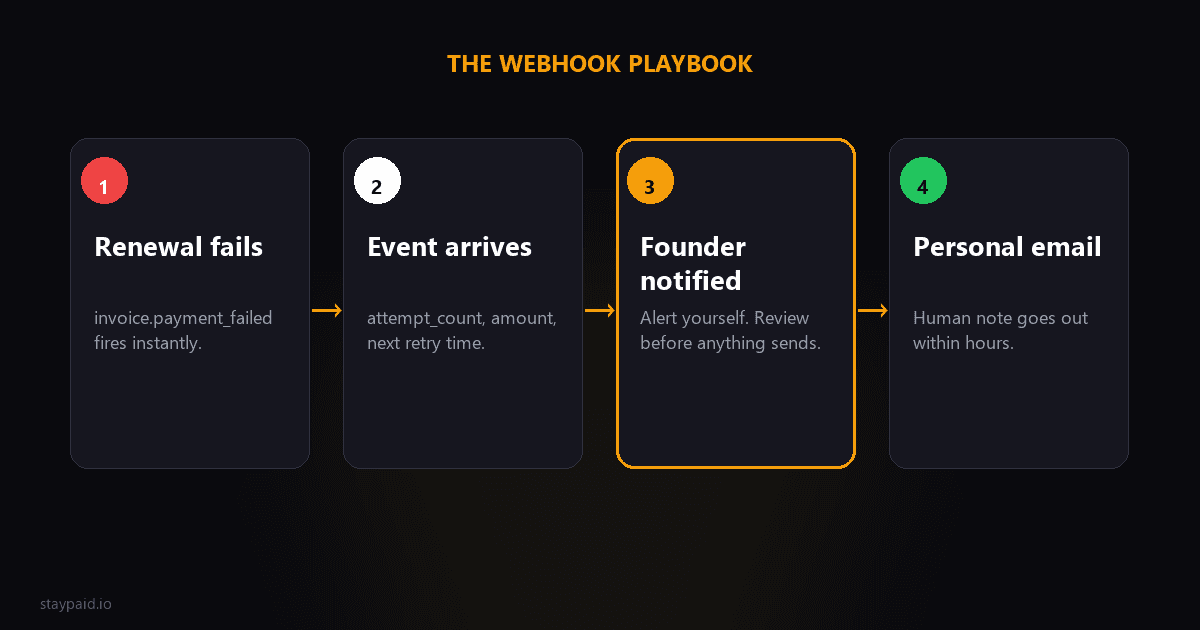
What is invoice.payment_failed?
invoice.payment_failed is a Stripe webhook event Stripe sends to your server the moment a payment on an invoice fails — almost always a subscription renewal whose card declined. It's your signal that a customer's payment didn't go through, and it's the single most useful event to build your recovery system around.
If you read Stripe's docs, this is a two-line entry in the API reference. That hides how much business logic lives behind it. This event is your earliest, most reliable heads-up that a customer is about to churn through a failed charge — the question is whether anything is listening when it arrives.
When it fires (and when it doesn't)
The important distinction is what this event is not. invoice.payment_failed fires when a payment on an invoice fails — meaning a recurring, subscription-backed payment. It does not fire for a one-off checkout where a customer abandons a purchase; that's a different failure with a different event. If you're trying to catch checkout declines, you're looking at the wrong webhook.
For the founder, the practical meaning is: every time this event lands, a current paying customer just had a renewal fail. That's a revenue leak in real time. The narrower the window between the event and your follow-up, the more likely you keep the customer — which is why the event deserves a real response, not silence.
What useful data the event carries
The event is a bundle of context, not just a flag. The parts worth building on are the fields on the invoice object that ships with it. A trimmed, illustrative shape looks like this:
"{ "object": "event", "type": "invoice.payment_failed", "data": { "object": { "id": "in_1...", "amount_due": 2900, "attempt_count": 2, "next_payment_attempt": 1712000000, "customer": "cus_...", "subscription": "sub_...", "status": "open" } } }"
- •attempt_count
- •— how many times Stripe has tried to collect. Use it to escalate: email once on first failure, harder on later ones.
- •next_payment_attempt
- •— when Stripe plans to retry next. Use it to schedule a follow-up that lands after the retry, not on top of it.
- •amount_due
- •— the dollar figure at stake, so you can prioritize high-value customers.
- •customer
- •— the pointer back to the affected customer, so you can pull their plan and history.
With just those four fields you can build a meaningful recovery flow without writing much code. The arithmetic is simple: the earlier you know about the failure and the higher the amount, the more effort the recovery deserves.
A worked example: prioritize by amount at stake
Say you have two customers who both get a failed renewal on the same morning. Customer A's invoice shows amount_due of $29. Customer B's shows $299 — an annual plan that fails just as their year renews. Those two events deserve very different responses even though they shipped in the same batch of webhooks.
Run the arithmetic and the logic is obvious. Customer B's $299 is on the line, and the same failed payment repeats next month for A. But the annual customer is charged once a year — if you don't fix B this week, you lose a year of revenue, not a month. That single customer is worth roughly ten of A. When the events land, your system should rank them and make sure B gets a personal follow-up fast.
This is exactly what the amount_due and subscription fields enable: a simple rule that thresholds by value and routes the big, time-sensitive failures to you while the small ones ride the automated sequence. You don't need complex logic to capture most of the value — you need to read the number and act accordingly.
A simple pseudo-flow to get started
If you're technical but haven't wired this up yet, here's a minimal flow that captures most of the recovery value without building a platform. The steps are plain enough to sketch before you write any real code:
- •Listen for the invoice.payment_failed event on a webhook endpoint.
- •Read attempt_count and next_payment_attempt from the invoice.
- •If attempt_count is 1, queue the first recovery email to the customer.
- •Schedule an internal alert to yourself for any customer over a value threshold.
- •If next_payment_attempt is set, hold further outreach until after Stripe's retry lands.
- •If attempt_count keeps climbing past a few, escalate to a personal email and, if needed, a manual review.
That's the whole loop, and it's hours of work, not weeks. Everything after that is polish: templates, timing tweaks, thresholds. The hard part isn't the code — it's deciding that a failed renewal is worth reacting to at all, and this event is the cheapest, most reliable way to make that decision automatic.
What not to automate blindly
This is where most founders go wrong. They either automate nothing and lose the window, or they automate too aggressively and torch the relationship. The right split is clear. Automate the boring, reliable parts, and keep a human on the judgment calls.
Automate these immediately, because they're cheap and they must not be missed:
- •Log the event.
- •Store the failure with its attempt count so you have a clean record of every declined renewal.
- •Alert yourself.
- •Send an internal notification so the failed payment exists in your awareness, not just in Stripe.
- •Queue the recovery email.
- •Start the first follow-up to the customer, ideally from your own address, within hours.
Do NOT blindly automate these on the first event:
- •Instant account lockouts.
- •Cutting off access at the first failed attempt punishes a transient decline and invites anger before the money could have landed.
- •Same-second angry emails.
- •The customer hasn't had a chance to react; a hostile first touch reads as a threat.
- •A full automated cancellation.
- •Cancelling on attempt one throws away a recoverable customer to save a few clicks.
The founder-in-the-loop pattern
The flow that recovers the most money keeps the machine doing the timing and the human doing the talking. It looks like this: the webhook fires, your system logs it and notifies you, and within a few hours a recovery email goes out — written in your voice, from your real address, with a personal touch. Retries run in the background. You step in for the cases that deserve your attention.
The webhook is the trigger, not the whole job. The actual recovery happens when a real person reaches a customer at the right moment. A reviewed email beats an automated one more often than most people expect, because it doesn't read like every other no-reply@ dunning blast the customer has already learned to delete.
As a founder you don't want to be the one staring at webhook logs at 2 a.m. You want the system to catch the signal, handle the easy recovery automatically, and surface the few cases that need you. That's the whole pattern: let the event trip the alarm, let the automation do the obvious work, and put a human on the money.
The practical payoff is that you stop losing customers in silence. Today most failed renewals fail once, Stripe retries a bit, nobody tells you, and the subscription quietly slides to past_due and out the door. Wiring even the minimal flow above kills that silence: every failure is logged, every customer gets a real follow-up, and the ones worth your time land in your inbox instead of vanishing. The webhook is the tiny piece of plumbing that makes all of that possible.
FAQ
What triggers invoice.payment_failed?
Stripe fires invoice.payment_failed whenever an attempt to pay an invoice fails — most commonly when a subscription renewal charge is declined. It's the signal that a customer's card didn't go through, and it's the event your recovery system should listen for.
What's the difference between invoice.payment_failed and charge.failed?
charge.failed fires for any failed charge, including one-off checkout payments with no subscription behind them. invoice.payment_failed fires specifically when a payment on an invoice — typically a subscription renewal — fails, and it carries subscription context like attempt_count and next_payment_attempt. For dunning, invoice.payment_failed is the one you want.
What is attempt_count?
attempt_count is a field on the invoice that counts how many times Stripe has tried to collect that invoice's payment. It starts at 1 and climbs with each retry. You can use it to change your behavior — escalate to a more urgent email after several attempts, or alert yourself when it keeps failing.
Does Stripe retry after this event?
Yes, if Smart Retries is enabled. Stripe will keep trying to collect the invoice on its own schedule, and each retry can fire another invoice.payment_failed event if it fails. So don't treat a single event as the end of the story — treat it as the start of your recovery window.
Keep reading
Robert
Founder at StayPaid
Want to recover failed payments like a founder?
Start Free — First 3 recoveries