Testing Stripe Webhooks Locally: A Founder's Guide (Before Real Payments Hit Them)
How to test Stripe webhooks locally with the CLI, simulate failed subscription payments, and catch the bugs that only show up when real money is involved.
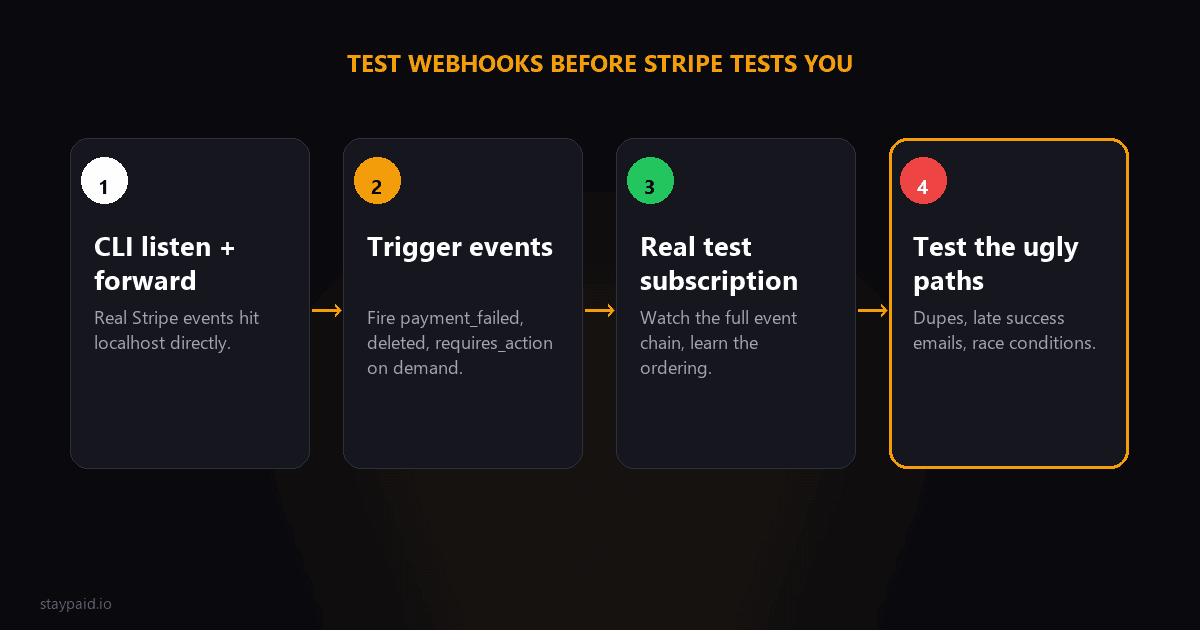
The short version
Install the Stripe CLI, run stripe listen --forward-to your local endpoint, and use stripe trigger to fire events at it. That covers 90% of webhook testing. The other 10% is simulating real billing sequences — failed renewals, retries, SCA limbo — because those are the flows where bugs actually cost you money.
Most webhook testing advice stops at 'did my endpoint receive an event.' That's table stakes. The bugs that hurt are the ones that only appear in sequences: the same event arriving twice, events arriving out of order, a payment_failed landing after a payment_succeeded. You can test all of that locally. Here's how.
Step 1: The Stripe CLI listen loop
The Stripe CLI is the whole ballgame for local testing. Install it, log in, then:
- •stripe listen --forward-to localhost:3000/api/webhooks — this opens a tunnel from Stripe's test environment to your machine and prints a signing secret (whsec_...) for the session.
- •Put that secret in your local env file. Your signature verification code now runs against real, correctly-signed events.
- •Leave it running. Every event in your test account now lands on your local endpoint.
Two things people miss. First, that whsec_ from the CLI is per-session — don't paste it into production, and don't be surprised when it changes next time you listen. Second, the CLI forwards events from your whole test account, not just ones it triggers. Anything you do in the Stripe dashboard in test mode shows up too.
Step 2: Trigger the events that matter
stripe trigger fires canned versions of common events. For billing work, the useful ones:
- •stripe trigger invoice.payment_failed — your dunning sequence's starting gun.
- •stripe trigger invoice.payment_succeeded — the 'close the case' signal.
- •stripe trigger customer.subscription.deleted — access revocation time.
- •stripe trigger payment_intent.payment_failed — fires for one-off charges.
Canned events have canned data. The amounts are small, the customers are fixtures, and the attempt counts are always the same. Good enough to test that your handler runs. Not good enough to test that your handler makes good decisions.
Step 3: Build the real scenario in test mode
This is where testing gets honest. Stripe gives you test cards with deterministic behaviors. The two that matter for dunning:
- •4000 0000 0000 0341 — always declines as a generic decline. Attach it to a test customer, create a subscription, and watch invoice.payment_failed roll in.
- •4000 0025 0000 3155 — requires 3D Secure authentication. Use it to see what an SCA-blocked renewal does to your system (hint: nothing, until a human acts — which is the whole problem).
To make a renewal fail fast instead of waiting a month, create the subscription with a one-day trial or a one-day billing anchor, or just charge the invoice manually from the dashboard. You want the full sequence: failure event, your dunning record created, your recovery email queued. Then swap the customer's card to the always-works test card (4242 4242 4242 4242), retry the invoice, and confirm invoice.payment_succeeded closes the case and suppresses the pending emails.
If your system still emails a customer after their payment succeeded, you just found the most embarrassing bug in dunning — in test mode, where it costs nothing.
Step 4: Test the ugly cases
- •Duplicate delivery: fire the same trigger twice and make sure your idempotency check skips the second one.
- •Out-of-order delivery: trigger payment_succeeded, then manually replay an older payment_failed payload. Your handler should check live state, not trust event order.
- •Slow endpoint: add an artificial delay and watch Stripe's retry behavior. Your endpoint should return 200 fast and do slow work in a queue.
- •Bad signature: send a request with a wrong secret and confirm you reject it. Never process an unverified payload.
Step 5: Test the retry sequence, not just the first failure
A single payment_failed event is easy. What breaks systems is the sequence: failure, retry, failure, retry, success on attempt three. Your dunning logic needs to track attempt counts correctly across all of that — the email that makes sense on attempt one ('looks like your card hiccuped') is embarrassing on attempt four.
In test mode, you can walk the whole sequence manually. Trigger the failure, check the record your system creates, then retry the invoice from the dashboard with the declining card still attached. Watch attempt two arrive. Check the customer's status in your database. Then swap in the working test card, retry once more, and verify the case closes cleanly and every pending email gets suppressed. Fifteen minutes, and you've rehearsed the exact flow your real customers will hit.
Step 6: The dashboard is your other test tool
The Stripe dashboard's webhook section shows every delivery attempt, the payload, your response code, and the retry history. In development, keep it open. In production, check it weekly for a while after launch — endpoints that silently 500 get retried for days, and the dashboard is where you'll see it.
You can also resend individual events from the dashboard. When a customer says 'I updated my card and you still emailed me,' replaying the actual events through your staging environment is how you find out what really happened.
Do the same drill for invoice.payment_action_required while you're in there. The 3DS limbo case is the one most dunning setups handle worst, because nothing 'fails' — the charge just waits forever for an authentication nobody triggers. Testing it forces you to answer the only question that matters: does your system email the customer a link to complete the payment, or does it silently wait for a click that never comes?
Common bugs this catches (from real dunning systems)
- •Body parsing before verification: frameworks that JSON-parse the request body break signature checks. You need the raw, untouched body for verification. This bug passes every casual test and fails every real one.
- •Trusting payload state: the invoice object in an event is a snapshot. By the time you process it, the real invoice may have been paid. Always re-fetch before acting.
- •Case sensitivity on event types: subscribe to the exact event names. invoice.payment_failed is not invoice.payment_failed.v2, and there is no warning when you guess wrong.
- •Not handling test-mode noise: if you forward all events, your handler sees every random dashboard click. Filter to the event types you actually act on.
One more habit worth stealing: keep a small folder of captured payloads from your test runs — one per event type you handle. When you change handler logic months later, replaying those fixtures through your staging endpoint is the fastest regression test you'll ever write. No Stripe round-trip, no CLI, just curl and the files.
The takeaway
Local webhook testing with the Stripe CLI takes ten minutes to set up and catches the bugs that would otherwise surface as 'customer got three dunning emails after paying' — the kind of bug that costs you the customer, not just the payment. Test the happy path with triggers, test the money path with real test-mode subscriptions, and test the ugly paths deliberately.
Or skip the plumbing entirely. StayPaid runs this whole pipeline for you — listening, deduping, sequencing, and sending recovery emails from your own address, with your approval on each one. Some founders genuinely love webhook plumbing. The rest of us would rather build product.
The five events worth testing before anything else
- •invoice.payment_failed: the event that starts your dunning flow. Trigger it with stripe trigger invoice.payment_failed, or with the 4000 0000 0000 0341 test card on a real test-mode subscription.
- •invoice.payment_succeeded: confirms a recovery happened and should stop any running dunning sequence.
- •customer.subscription.trial_will_end: fires three days before the first real charge, your last chance to validate the card before money is at stake.
- •customer.subscription.updated and customer.subscription.deleted: plan changes and cancellations drive your access control and retention reporting.
- •charge.dispute.created: rare, but the one you least want to discover untested during a live dispute window.
Testing retries, not just deliveries
A single successful delivery tells you almost nothing about production behavior. Take your endpoint down on purpose, let Stripe retry on its real schedule, and confirm your handling works when events arrive late and out of order. The CLI forwards events instantly; Stripe's actual retry schedule stretches across three days. Those are different systems, and only one of them is real.
One more trap: idempotency. Because Stripe retries, your handler will see the same event more than once. Store processed event IDs and make every handler safe to run twice. Testing this is simple: forward the same event twice and confirm nothing fires twice.
The 15-minute test suite worth keeping
Keep a small script that sends your staging endpoint the five events above in sequence, then asserts the side effects: dunning started, dunning stopped, access granted, access revoked, dispute logged. Run it on every deploy that touches billing code. Fifteen minutes to build, and it catches the class of bug that otherwise surfaces as a customer email.
FAQ
How do I test Stripe webhooks on localhost?
Use the Stripe CLI. Run stripe listen --forward-to localhost:3000/api/webhooks in one terminal, then trigger events with stripe trigger invoice.payment_failed in another. The CLI signs events correctly, so your signature verification code runs exactly as it will in production.
Can I trigger a specific webhook event in Stripe?
Yes. The Stripe CLI's stripe trigger command can fire common events like payment_intent.succeeded and invoice.payment_failed on demand. For events the CLI doesn't support, build a subscription in test mode with a test card and let the billing cycle fire the real thing.
How do I test a failed subscription renewal in Stripe test mode?
Attach Stripe's test card 4000 0000 0000 0341 to a test customer — it always declines. Create a subscription with a short trial so the first invoice charges quickly, and you'll get a real invoice.payment_failed event through your listener.
Why does my webhook work in the CLI but fail in production?
Almost always one of three things: the production endpoint uses the wrong signing secret (each endpoint has its own), the server framework is parsing the request body before signature verification (you need the raw body), or the endpoint is too slow and Stripe's retry logic is hammering it with duplicates.
Keep reading
Robert
Founder at StayPaid
Want to recover failed payments like a founder?
Start Free — First 3 recoveries