customer.subscription.deleted: When It Fires, What to Check, and What to Do Next
customer.subscription.deleted is Stripe's final word on a subscription. When it fires, what the payload tells you, and the 4 things your app should do.
What customer.subscription.deleted actually means
customer.subscription.deleted fires when a Stripe subscription is fully terminated. Not paused, not past due, not scheduled to cancel. Done. It's Stripe's final word on a subscription, and your app should treat it as the moment the customer relationship needs a decision.
If you handle subscription webhooks at all, this one matters more than people expect, because it fires for four very different reasons and each reason deserves a different response from your app.
The 4 reasons it fires
- •Immediate cancel. Someone (the customer, you, or your code) cancels and the subscription ends right now.
- •End of paid period. The customer set cancel_at_period_end earlier, time ran out, and the subscription just ended. This one surprises apps that only listen for deleted and ignore updated.
- •Trial expired without payment. A trialing subscription with no payment method ends as deleted.
- •Dunning exhausted. A renewal failed, Stripe retried per your settings, gave up, and marked the subscription canceled or unpaid. Involuntary churn, arriving as a webhook.
That last one is why this event belongs in a revenue recovery blog. Every involuntary churn story ends with this webhook. If you run dunning, your recovery sequence's job is to make sure it never fires for payment reasons.
Deleted vs updated: the distinction that trips everyone
Stripe splits the cancellation story across two events. When a customer schedules a cancel at period end, you get customer.subscription.updated with cancel_at_period_end set to true. The subscription is still alive, the customer still has access, and they might still be saved. Only when the period actually ends does customer.subscription.deleted fire.
Apps that only listen for deleted treat every scheduled cancel as a happy customer right up until the day they're gone. Apps that listen for both get a two-week warning with a save opportunity attached. Listen for both.
What a sane handler looks like
Without turning this into a code tutorial, the handler shape is always the same. Verify the signature, pull the subscription object from the event, mark the customer's account state in your own database, and enqueue any follow-up emails instead of sending them inline. Webhook handlers should be fast and boring: acknowledge the event in a couple hundred milliseconds, do the real work in a queue.
Two rules save you from 90 percent of webhook pain. First, make the handler idempotent, because Stripe will sometimes deliver the same event twice and your handler should shrug and produce the same state. Second, key everything off the customer and subscription IDs, not the event ID, so a late or duplicate event can't resurrect a dead subscription or kill a live one.
What to check in the payload
The payload is the full subscription object at its final state. The fields worth reading before you act:
- •status, which will be canceled.
- •canceled_at and ended_at, the timestamps of the decision and the termination. A gap between them means the cancel was scheduled.
- •cancellation_details, which tells you the reason when Stripe knows it, including whether it came from a payment failure.
- •latest_invoice, your pointer to the invoice that failed if this was involuntary.
One trap: a subscription deleted because of failed payments looks almost identical to a voluntary cancel if you only check status. Check cancellation_details before you file the customer under didn't want it anymore. Half the time they never made a decision at all.
What your app should do when it fires
Four things, in order of importance:
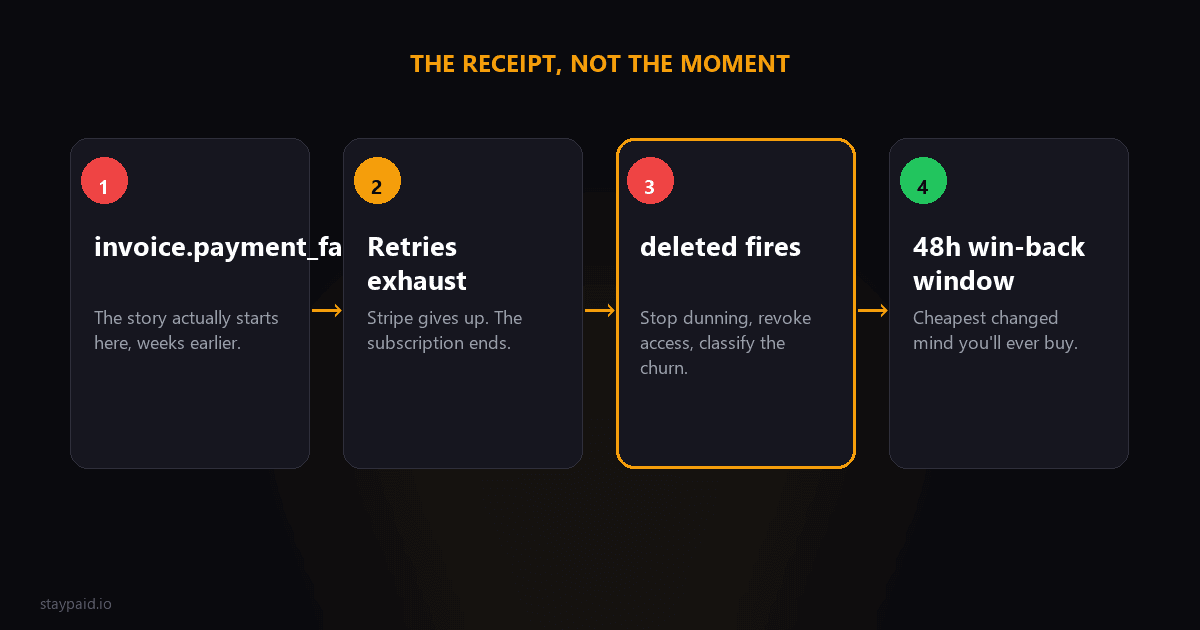
- •Stop any dunning or win-back automation for this customer immediately. Emailing someone after the subscription is already dead is how you get marked as spam.
- •Revoke or downgrade access. Whether that's instant or after a grace window is a product decision, but the webhook is your trigger either way.
- •Record the reason. Voluntary cancel and payment-failure cancel need different follow-ups and different metrics.
- •Start the right follow-up. Voluntary churn gets a win-back sequence. Involuntary churn gets a last-chance recovery email, because the card problem might still be fixable.
Notice what's not on that list: sending an email from inside the handler. Webhook handlers should acknowledge fast and enqueue everything else. A handler that renders and sends email inline will eventually hit a timeout, Stripe starts retrying the event, and now you're debugging two problems instead of one.
On the win-back point, timing matters more than copy. The first 48 hours after cancellation are when a changed mind is cheapest: the customer still remembers your product, their data is still there, and coming back is one click. A win-back email sent three weeks later competes with whatever they replaced you with. Enqueue the first one the day this webhook lands.
The mistakes I see founders make
deleted vs invoice.payment_failed: which one means churn
A subscription deletion and a failed payment are different events with different meanings, and mixing them up breaks churn reporting. invoice.payment_failed means a charge attempt failed; the customer is still subscribed and recoverable. customer.subscription.deleted means the subscription is over, whether the customer canceled, you canceled them, or Stripe auto-canceled after your dunning window closed. The full handling guide for the failure side is in /blog/invoice-payment-failed-webhook-guide. The rule of thumb: payment_failed starts your recovery clock, deleted ends it.
First: only listening for deleted and missing cancel_at_period_end. The customer who scheduled a cancel two weeks ago is your best win-back opportunity, and they announce themselves via customer.subscription.updated, not deleted. If you only listen for the funeral, you miss the warning.
Second: treating deleted as the start of the story for failed payments. It isn't. The story started at invoice.payment_failed, possibly weeks earlier. Deleted is the epilogue. Your recovery system should live upstream of this event, with deleted as the signal to stop it.
Third: ignoring it entirely because Stripe handles cancellations. Stripe terminates the subscription. It does not touch your database, your feature flags, or your email queue. That part is on you.
A word on grace windows, because it's the decision hidden inside that list. Revoking access the second this event fires is technically correct and often terrible in practice. If the deletion came from exhausted payment retries, the customer may not even know their card failed yet. Cutting them off instantly converts a recoverable billing hiccup into a bad experience. A 3 to 7 day grace window, with the account flagged and the customer emailed, costs you almost nothing and preserves the recovery conversation. Voluntary cancels are different. That customer made a decision, and an access wall is part of the deal. The mistake is treating both deletions identically. The webhook payload won't tell you which kind you're looking at directly, but your database will: if this customer had an open past_due invoice when the deletion arrived, it's involuntary. One extra query in the handler buys you the right follow-up every time. Log which kind each deletion was while you're in there, because your churn reporting is only as honest as this classification. That log line takes a minute to add and saves you from re-deriving it every month.
Testing it before you need it
The Stripe CLI makes this easy. Run stripe listen --forward-to your local endpoint, then stripe trigger customer.subscription.deleted, and watch your handler do its thing. Better: cancel a real test-mode subscription from the dashboard and walk through the full flow, including whatever emails your app queues.
Test the unhappy paths too. What happens when the event arrives twice? What happens when the subscription ID doesn't match anything in your database, which happens more than you'd think with old test data? A handler that logs and moves on beats one that throws and makes Stripe retry for three days.
"customer.subscription.deleted is not the moment you lose the customer. It's the receipt for a loss that happened earlier. The question is whether your app was listening upstream."
FAQ
When does customer.subscription.deleted fire?
When a subscription is fully canceled: immediately on cancel, at the end of a paid period after cancel_at_period_end, when a trial ends without payment, or when Stripe exhausts failed-payment retries.
What is the difference between customer.subscription.updated and deleted?
Updated fires on any change, including a pending cancellation with cancel_at_period_end set. Deleted only fires when the subscription is actually terminated. Pending cancels are updated events, not deleted.
Does customer.subscription.deleted fire when a payment fails?
Not on the first failure. It fires only after your Stripe retry settings give up and mark the subscription canceled or unpaid, depending on your dunning configuration.
How do I test customer.subscription.deleted locally?
Use the Stripe CLI: stripe listen --forward-to your local endpoint, then trigger the event with stripe trigger customer.subscription.deleted or cancel a test subscription in the dashboard.
Keep reading
Robert
Founder at StayPaid
Want to recover failed payments like a founder?
Start Free — First 3 recoveries