Stripe Webhook Signature Verification Failed: Every Cause, In the Order You Should Check Them
Stripe webhook signature verification failed, or no signatures found matching? Every cause, in the order you should actually check them.
What this error actually means
Signature verification failed means your code hashed the webhook payload with your signing secret and the result didn't match the signature Stripe sent. The event may be perfectly real. Your verification just can't prove it, so your handler rejects it. Correctly, by the way.
The frustrating part is that the error message tells you nothing about why. No signatures found matching the expected signature for payload covers at least six different problems. Here's every cause I've hit or helped someone else hit, in the order you should check them.
How the signature scheme works (30 seconds)
Stripe signs each webhook with your endpoint's signing secret and sends the result in the Stripe-Signature header, as a timestamp plus one or more v1 signatures. Your code computes its own HMAC over the timestamp plus the raw body, using the same secret, and compares. If they match, the event came from Stripe and wasn't touched in transit. If anything differs by a single byte, mismatch. That byte-level sensitivity is the whole point, and also the source of every debugging story below.
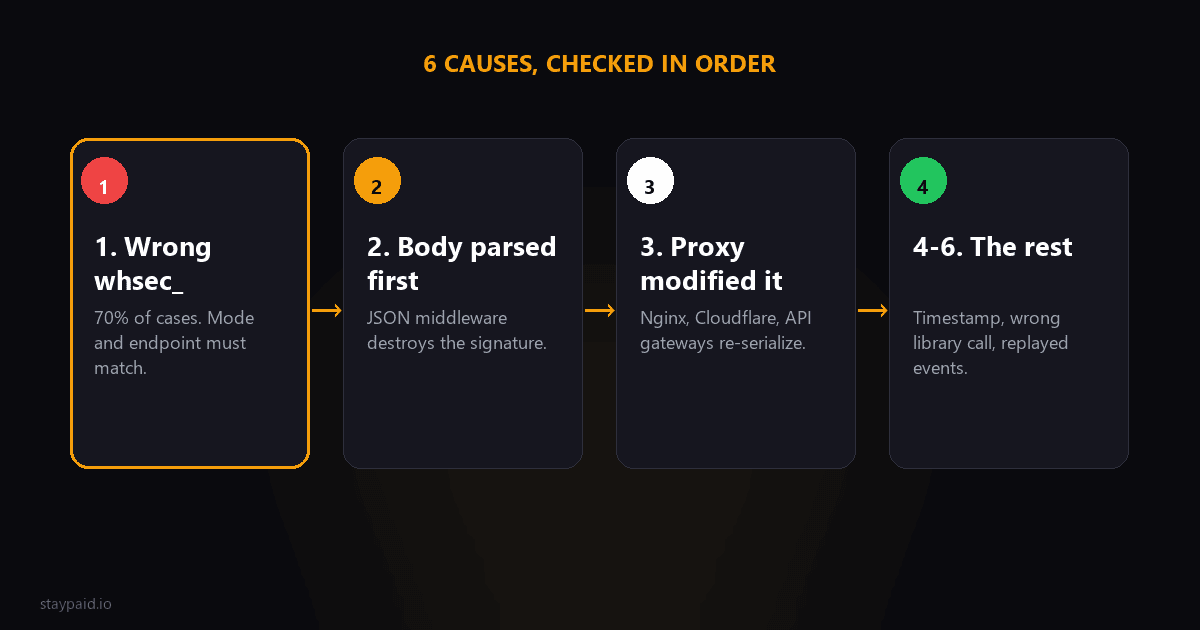
1. Wrong secret (the cause about 70 percent of the time)
Each webhook endpoint gets its own signing secret, starting with whsec_. The endpoint in your test dashboard has one. The endpoint in live mode has a different one. The Stripe CLI, when you run stripe listen, prints a third one. If any of these get mixed up, every verification fails.
Check, in order: is this event from test or live mode? Which endpoint sent it? Does the secret in your environment variable match that exact endpoint's secret in the dashboard? A stale whsec_ from a deleted endpoint is the classic version of this bug.
2. Your framework parsed the body first
Signature verification needs the raw, untouched request body. The exact bytes Stripe sent. If your framework parses JSON before your verification code runs, the body gets re-serialized, key order or whitespace shifts by a byte, and the hashes never match again.
This is the Express special: app.use(express.json()) applied globally eats the raw body before your webhook route sees it. The fix is to give the webhook route express.raw() instead. Next.js route handlers give you the raw body via await req.text(), but middleware that touches the body breaks it the same way. Rails, Laravel, Django all have their own version of this trap. If verification fails on every single event, suspect this first after the secret.
3. Something between Stripe and you modified the payload
Proxies, API gateways, WAFs, and serverless platforms sometimes normalize request bodies: trimming whitespace, re-encoding, reordering. Any change, even one byte, breaks verification. If events verify fine locally via the CLI but fail in production, this is your suspect.
Cloudflare in front of your endpoint is a common culprit here, as are some hosting platforms' edge layers. Log the raw body your code actually receives and compare it to what the Stripe dashboard shows for that event. Diff them. The difference is your bug.
4. Timestamp tolerance
Stripe's signature includes a timestamp, and verification rejects events older than a few minutes to block replay attacks. If your server's clock is badly wrong, valid events look stale. Rare, but if you're on a weird VPS or a container with drifted time, check it. The error for this one at least mentions the timestamp.
5. You're verifying with the wrong library call
Stripe's official libraries have a constructEvent method that does verification for you. Hand-rolled HMAC implementations fail in creative ways: hashing the body without the timestamp prefix, using the wrong encoding, comparing strings instead of using a timing-safe comparison. If you wrote your own verification, delete it and use the library. This is not the place for artisanal crypto.
6. You're testing with a replayed or forwarded event
Events replayed from the Stripe dashboard, or forwarded through a tool that re-sends the payload, carry the original signature with a body that may have changed in transit. If verification fails only for replayed events but live ones pass, nothing is broken in your code. Test with fresh events instead: stripe trigger for the event type you need.
Framework-specific notes, because this is where you're actually stuck
- •Express: mount express.raw({ type: 'application/json' }) on the webhook route only, before any global express.json() can touch it.
- •Next.js App Router: use await req.text() in your route handler, not req.json(). The parsed object can't be turned back into the exact original bytes.
- •Serverless platforms: some parse the body before your function runs. Check whether your platform offers a raw-body or pass-through option for the route.
- •Stripe CLI forwarding: when testing locally, use the signing secret the CLI prints when stripe listen starts, not your dashboard endpoint's secret.
A 5-minute debugging routine
When verification fails, work through this in order. One: confirm which endpoint and mode the event came from, and re-copy that exact whsec_ secret. Two: log the first hundred characters of the raw body your handler receives and compare with the event payload in the Stripe dashboard. Three: confirm nothing in your middleware chain touches the body before verification. Four: fire a fresh test event with the CLI and see if it passes. Most failures die at step one or two.
When it's genuinely not your code
Occasionally verification fails in production while your setup is correct. The classic case: someone replayed an old event from the dashboard, or a teammate created a second endpoint and your secret now verifies one and not the other. Before you tear apart your middleware, check the Stripe dashboard's webhook attempts log. Each failed delivery shows the endpoint and the error. If the failures all trace to one endpoint or one replay, your code was never the problem. And once it's fixed, keep a tiny bit of monitoring on it. A single log line or alert on verification failures means the next time a deploy swaps an environment variable, you find out in minutes instead of at the end of the month when a customer asks why their access disappeared. Signature failures are silent revenue bugs: the events still fire, you just never see them. The attempts log also shows you the exact error Stripe recorded, which beats guessing from your own logs alone. Five minutes in that log usually beats an hour in your middleware.
If you're here because verification broke right after a deploy, check your environment variable handling first. A surprising number of production failures are a truncated whsec_ secret pasted into a hosting dashboard that silently cut off the last characters, or a secret with a trailing newline. Log the secret's length on boot, compare it against the dashboard, and you've saved yourself an afternoon.
Why you should never just skip verification
Every few months someone posts the fix: comment out the verification line. Please don't. An unverified webhook endpoint is an open door for forged events. Anyone who finds your endpoint URL could send a fake invoice.payment_succeeded and grant themselves access. The signature is the only thing proving the event came from Stripe. Fix the cause, don't delete the lock.
"Signature verification failing isn't Stripe being flaky. It's your setup telling you, correctly, that it can't prove who sent the payload. Listen to it."
The three flavors of this error
- •Signature mismatch: the computed signature does not equal the header value. Usually a raw-body problem or a wrong secret; the signing secret guide walks through the five production causes.
- •Timestamp outside the tolerance window: Stripe rejects events with an old timestamp to block replay attacks. If your server queues events before verifying, verify first and queue after.
- •Missing or malformed header: a proxy, CDN, or API gateway stripped the Stripe-Signature header. Check every layer in front of your endpoint.
Why it fails at 2am and works in your tests
Test events from the dashboard and the CLI are sent fresh, with a current timestamp, to an endpoint you control directly. Production events pass through retries, queues, load balancers, and serverless cold starts. Every hop is a chance for the body or headers to change. 'Cannot reproduce locally' is the norm with this error, not the exception.
The durable fix is boring: verify the raw body before any parsing, load the secret per endpoint and per mode, and alert on repeated verification failures. A spike in failures is either an attack or a misconfiguration, and both deserve attention the same hour.
When to accept the event anyway (never)
Every few months someone asks whether it is safe to skip verification for 'internal' endpoints or during an outage. It is not. An unverified webhook endpoint is an open form that accepts forged payment-succeeded events from anyone who finds the URL. If verification is failing, reject and alert. Never fall open.
FAQ
Why does Stripe webhook signature verification fail?
Almost always one of three causes: you're using the wrong signing secret, your framework is parsing the request body before verification, or a proxy is modifying the raw payload in transit.
What does no signatures found matching the expected signature mean?
The signature Stripe sent doesn't match the one your code computed. Either the secret is wrong, or the body you hashed isn't byte-identical to what Stripe sent.
Is the webhook signing secret the same as my API key?
No. The signing secret starts with whsec_ and is specific to each webhook endpoint. Your secret API key starts with sk_ and can't be used for verification.
Does signature verification fail differently in test mode?
Test and live modes have separate webhook endpoints with separate secrets. A common cause of failures is verifying a test event with the live secret or the other way around.
Keep reading
Robert
Founder at StayPaid
Want to recover failed payments like a founder?
Start Free — First 3 recoveries