5 Dunning Email Templates That Actually Recover Payments (Steal These)
Copy-paste dunning email templates for every stage of a failed payment — from the first nudge to the graceful goodbye.
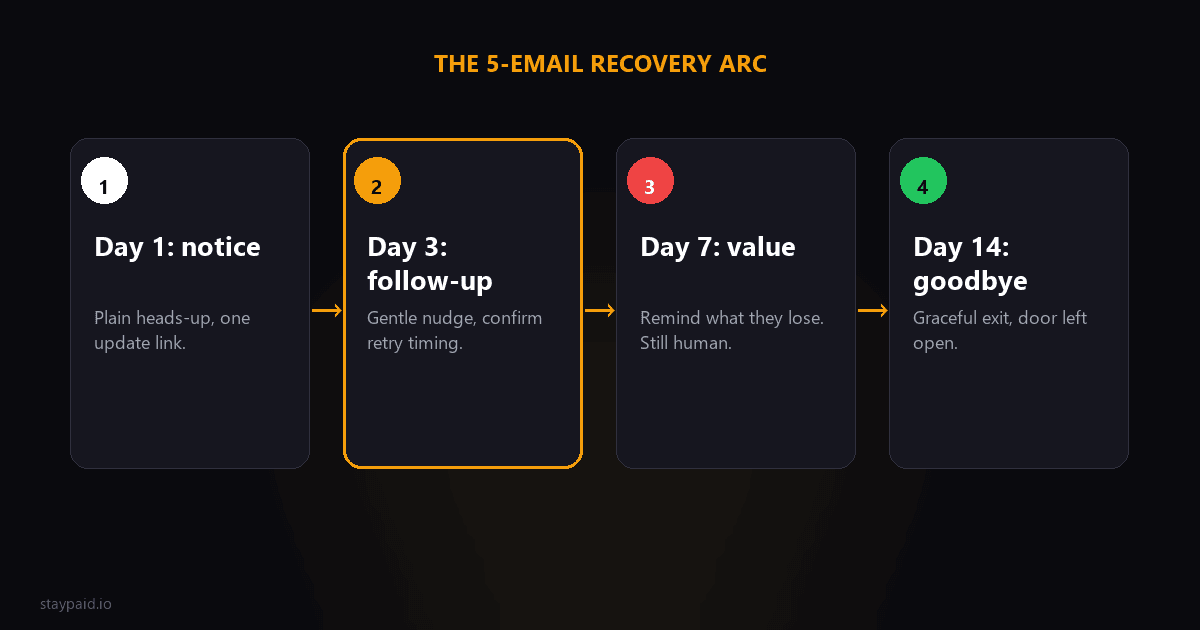
Dunning emails work when they sound like a person wrote them, and stop working the moment they sound like a billing department. Below are the five templates I'd actually send as a founder — day 1, day 3, day 7, day 14, plus the pre-dunning expiring-card email — each with a subject, a body you can copy, and the why behind it.
Here's the uncomfortable truth nobody sells you: the customer who missed a payment almost never decided to leave. Their card expired, their bank got cautious, or the charge hit on the wrong day of the month. The only question is whether your email makes it easy to fix — or makes them feel like a deadbeat. These five are built for the first case. Steal them, change the names, add your own voice, and cut anything that doesn't sound like you when you read it out loud.
Before you send anything: five rules
- •Send from your real address, never no-reply@. Your name in the from line is the single most powerful thing in this sequence.
- •One link, one action. A dunning email with two CTAs is a dunning email that gets neither.
- •No fake urgency. No 'FINAL NOTICE' in all caps, no countdown timers you don't mean. Customers can smell it.
- •Write P.S. lines that sound human. That's where the personality lives and where replies happen.
- •Stop the sequence the moment they pay or respond. Nothing says 'robot' louder than a third email after they've already fixed it.
Every template below follows those rules. They're short on purpose — a dunning email that needs a scrollbar doesn't get read. And every one assumes the failure is innocent, because nine times out of ten it is.
Template 1 — The day 1 nudge
"Subject: Quick heads up — today's payment didn't go through. Hi {{first_name}}, just a heads up that today's payment for {{product}} didn't go through. Usually it's just an expired card or your bank being cautious — not a big deal. You can fix it in 30 seconds here: {{update_link}}. Any trouble, just hit reply. — {{founder_name}}"
Why it works
- •It lands within hours, while the failure is still top of mind and the card is still fixable.
- •It assumes the best. No shaming, no threats, no “INVOICE #” energy.
- •Exactly one action and one link. The only job is to get them to the update page.
- •It sets the tone for everything after — if the first email feels like a person, the next three feel like that same person following up, not a machine nagging.
Template 2 — The day 3 follow-up
"Subject: Still stuck — {{product}} payment. Hi {{first_name}}, one more nudge — the payment for {{product}} still hasn't gone through, so your account is running on borrowed time. Update your card here: {{update_link}}. If something looks wrong on our end, reply and I'll dig into it myself. — {{founder_name}}"
Why it works
- •It introduces mild urgency without a fake countdown. “Running on borrowed time” is true, not manufactured.
- •The offer to dig in personally is the difference between ignoring the email and replying with 'yeah, actually my card expired.'
- •It catches the huge chunk of people who saw the first email, meant to fix it, and forgot.
Template 3 — The day 7 value reminder
"Subject: Don't lose {{specific_value}}. Hi {{first_name}}, one more try — the payment for {{product}} still hasn't gone through, so your account is about to lapse. That means losing {{specific_value}} — your data, your history, your setup. Still want it? The 30-second fix is here: {{update_link}}. If you're done with it, just tell me and I'll close it out cleanly, no hard feelings. — {{founder_name}}"
Why it works
- •It turns the abstract “your account will be suspended” into something concrete — {{specific_value}} is theirs, and losing it is real.
- •It offers a graceful out. Paradoxically, giving people a painless way to cancel keeps more of them in.
- •The personal “tell me and I'll close it” removes the friction of needing to find a cancel button.
Template 4 — The day 14 graceful goodbye
"Subject: Closing your {{product}} account this week. Hi {{first_name}}, last note from me. The payment still hasn't gone through, so I'll be pausing your {{product}} account in the next few days. Nothing is deleted — your data stays put, and if you ever want back in, update your card here and everything picks up where it left off: {{update_link}}. Thanks for being a customer. — {{founder_name}}"
Why it works
- •Honest finality. No “FINAL NOTICE,” no threats — it closes the loop respectfully.
- •It leaves the door open. Pausing instead of deleting means a win-back later costs them nothing.
- •Some of the best recoveries come from this exact email, because it finally sounds like a human choosing to end things kindly.
Template 5 — The pre-dunning expiring-card email
"Subject: Your card expires this month — {{product}}. Hi {{first_name}}, quick heads up that the card on file for {{product}} expires at the end of {{expiry_month}}. If it's still the right card, update the new details here so your subscription keeps running without a hitch: {{update_link}}. Takes under a minute. — {{founder_name}}"
Why it works
- •It prevents the failure from happening at all, which costs you nothing to recover.
- •It reads as a thoughtful heads-up, not a bill — a small moment of goodwill before a charge is ever missed.
- •It's your cheapest dunning email, because the best payment recovery is the one you never have to do.
One more upgrade that belongs on top of every template: add a P.S. that proves a person wrote it. “Saw you just shipped the new dashboard to your team — hope it went well” is worth more than any paragraph you could add to the body. It doesn't need to be clever or salesy — just one specific, human observation that only someone paying attention could have made. That single line is the highest-leverage sentence in the whole sequence, because it's the difference between a template a customer ignores and an email a customer replies to with ‘yeah, I've been meaning to fix my card.’
Common questions
How many dunning emails should I send before giving up?
A day 1 nudge, a day 3 follow-up, a day 7 value reminder, and a day 14 goodbye is a solid, proven arc. Past that you're emailing people who aren't going to pay — and you're risking a Stripe risk-score ding by retrying dead cards over and over. Stop at four and pivot to win-back later.
Should dunning emails come from no-reply or from a person?
From a person, every time. A no-reply@ address tells the customer there's nobody to talk to, which makes them treat the email as spam and quietly let it lapse. From your own address, with your name in the signature, they can reply — and a meaningful share of recovered payments start with a reply, not a card update.
How soon after a failed payment should I send the first email?
Within hours, not days. If the card is only temporarily declined — say a payday-timing issue — the longer you wait, the more likely another charge comes and fails again before the customer fixes anything. Day 1 is the moment the problem is real enough to act on and fresh enough to matter.
What tone should a dunning email use?
Casual, honest, and on the customer's side. Assume the failure was a mistake, give them one easy action, and never threaten. A dunning email that sounds like a person trying to help recovers more payments than one that sounds like a collections agency — every time.
This is exactly the sequence StayPaid runs for you — day 1, day 3, day 7, and day 14 scheduled automatically after every failed payment, with your name, your product, your links, and your P.S. baked in. You review each one, tweak the voice, and send. You do the founder part; the tool handles the remembering. Start with the day-1 nudge, keep everything short, and never let a machine sign a letter a person should sign.
FAQ
How many dunning emails should I send for a failed payment?
Four is the sweet spot: day 1 notice, day 3 follow-up, day 7 value reminder, and day 14 graceful goodbye. Fewer and you leave recoverable revenue behind; more and you start training customers to ignore you.
Should dunning emails come from a no-reply address?
No. Emails from a real person's address get opened and answered; no-reply@ reads as a billing robot and gets filtered mentally if not literally. Send from your own address and let people reply directly to you.
How soon after a failed payment should the first email go out?
Within a few hours of the first decline. The customer often doesn't know it failed, and the fastest, friendliest heads-up has the highest fix rate. Waiting a week turns a two-minute card update into a reactivation problem.
What tone should a dunning email use?
Casual, personal, and zero blame. Assume the best — expired card, bad timing, cautious bank — and make the fix the only action. Fake urgency and legal-sounding threats recover payments and kill relationships.
Keep reading
Robert
Founder at StayPaid
Want to recover failed payments like a founder?
Start Free — First 3 recoveries