Card Updater Services: How Automatic Card Updates Quietly Save Your Renewals
Card updater services explain why reissued cards keep subscriptions alive — and what they can't fix. A founder-level guide.
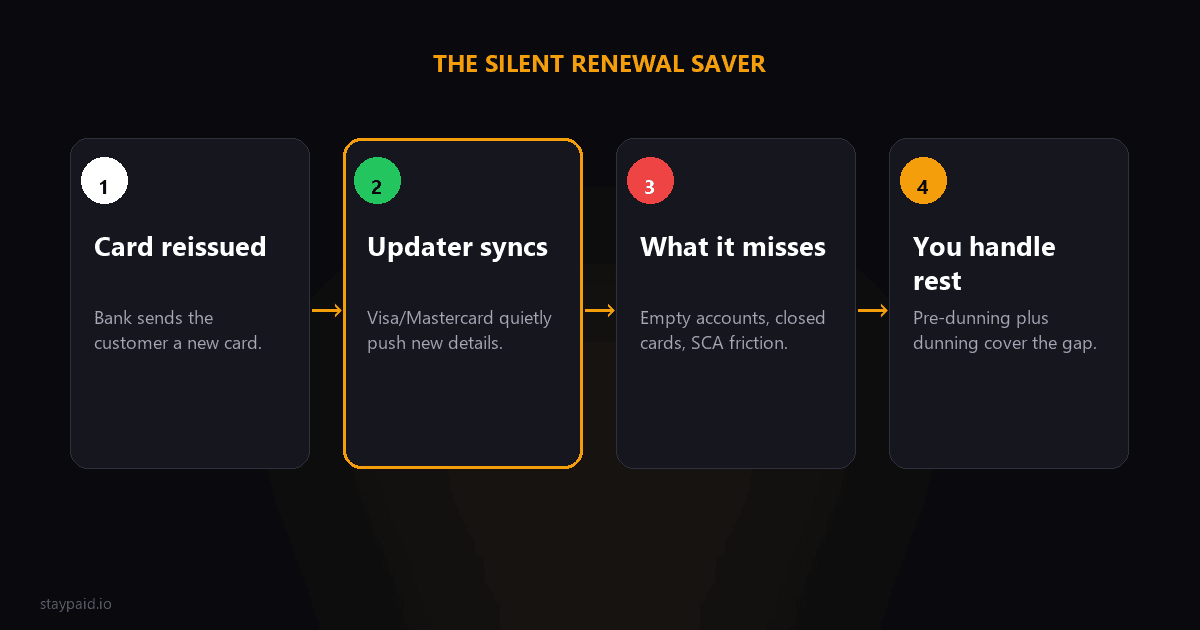
What is a card account updater?
A card account updater is a silent background service that refreshes the card details you have stored for a customer when the card itself changes. When someone gets a replacement card — new number, new expiry — the network tells Stripe, and Stripe swaps in the new details automatically. The renewal succeeds like nothing happened.
The two networks that run the big ones are Visa (the Visa Account Updater, or VAU) and Mastercard (the Account on File service, sometimes called ABU). Both do the same job: they let the merchant's stored card data follow the real card even after the customer never thinks to update it. Almost nobody knows their card got reissued. That's exactly why the updater matters.
It's easy to underestimate how many of your churned customers were lost to a silent reissue. A customer's card gets stolen, compromised, or just replaced by the bank. The old number dies. Your subscription tries the old card, it fails, and if nothing refreshes it the customer churns without ever touching their account. The updater kills that whole category of failure before it starts.
How Stripe's automatic card updates work
When you store a card on a Stripe subscription — usually through a PaymentMethod attached to a Customer — Stripe can register it for automatic card updates. Here's the rough flow:
- •A customer's card is reissued or replaced by their bank.
- •The card network (Visa VAU or Mastercard Account on File) learns about the change.
- •Stripe receives the updated card details through its updater integration.
- •The stored card on the subscription is refreshed with the new number and expiry.
- •The next renewal charges the new card, and the payment succeeds with zero customer effort.
The beautiful part is the customer is never bothered. There's no email, no re-entering a card number, nothing. For the founder it means one less way to lose a customer. For a SaaS with hundreds or thousands of subscribers, this quietly saves a real slice of revenue every month.
What it actually fixes
The updater fixes reissued and replaced cards. That's the headline. If a card was renewed with a new expiry, or a new number was issued for the same account, the updater sees it and keeps your stored data current. In effect, the customer switches cards and your billing just keeps working.
This is genuinely valuable, because card reissue is a very common reason subscriptions die. Banks replace cards all the time — theft, suspected fraud, chip expiry, a new card design. The customer usually pays no attention. Without an updater, every one of those is a failed renewal and a possible lost customer.
What it does NOT fix
This is the part founders get burned by. The updater is narrow. It fixes exactly one thing — a reissued card — and nothing else. These all still fail even with the updater running:
- •Insufficient funds.
- •The new card works, but there's no money on it. The updater doesn't fix an empty bank account.
- •A closed account or canceled card.
- •If the customer closed the account entirely, there's no new card to update to.
- •SCA / authentication challenges.
- •A renewal that needs 3D Secure approval still needs the customer, and the updater can't approve anything.
- •Banks that don't participate.
- •Not every issuer is in the network, so some cards never get updated.
- •Customers who switched banks.
- •A whole new bank means a whole new card the updater has no record of.
Read that list twice. Most failed payments you'll actually chase are insufficient funds and declined charges — not reissued cards. So the updater is a great prevention layer, but it is not a dunning system, and it won't tell you when a customer has a card that needs a human to fix it.
A quick arithmetic sanity check
Let's make the value concrete with a simple example. Say you have 500 subscribers at $29 a month, which is roughly $14,500 in monthly recurring revenue. A small share of monthly renewals fail — in a typical cohort, a few percent. Call it 15 failed renewals a month. Most founders would be happy to see 10 of those come back with a card update, a retry, or an email.
Now ask what portion of failures the updater quietly removes. If even a quarter of those 15 — about 4 renewals — are reissued cards the updater fixes for free, that's 4 subscriptions that never failed at all. At $29 each, that's about $116 a month recovered with zero effort, every single month. Across a year, roughly $1,400 in revenue you keep without lifting a finger. The numbers scale up cleanly from there: the same math at 5,000 subscribers is ten times the windfall.
The point isn't the exact figure — your cohort split will look different. It's that prevention compounds. The failures the updater removes in month one stay removed forever, and you never spend a single minute on them.
What a founder should actually do this week
Getting value from card updates takes a few minutes and no code on your end. Here's the practical checklist:
- •Confirm on your cards on file.
- •When you attach a card to a Stripe customer, make sure it's stored for future payments rather than a one-time charge, so the updater applies.
- •Keep Smart Retries on.
- •The updater often works alongside Stripe's retry logic, and turning retries off removes a safety net for transient declines.
- •Watch your decline reasons.
- •If you see a meaningful number of expired_card or reissues slipping through, check whether the bank participates in the updater.
- •Set up pre-dunning for expiring cards.
- •For cards about to expire, email the customer before the failure instead of after.
- •Have a dunning sequence ready for what the updater can't fix.
- •Insufficient funds and declines still need a human email.
Why you still need dunning even with the updater on
The updater is silent — and silence is a double-edged sword. When it works, great, nobody knows. When it can't fix the problem, it also stays silent. The payment fails, the bank sends back a decline, and unless you have a system watching for it, the renewal just quietly fails and your subscription slides toward churn.
That's the gap. The updater handles the cases where the machinery can fix itself. Everything else — the insufficient funds, the closed account, the declined card — is now your job, and it needs a human touch to get a customer to update their card. A card updater and no dunning is like fixing the leaky pipe but never checking the water bill.
Updater + pre-dunning + dunning = the stack
The strongest setup treats these as three layers, not competitors. First, the card updater silently fixes reissued cards — prevention you never hear about. Second, pre-dunning catches expiring cards before they fail, so the customer updates ahead of time. Third, personal dunning recovers everything the first two miss.
Each layer catches a different failure type, so each one meaningfully reduces your involuntary churn on its own and the stack compounds. Skipping the first two because you have the third means paying more attention to every failed payment. Skipping the third because you have the first two means watching money walk out the door on declines the updater can't touch.
This is exactly the layered thinking behind how I built StayPaid. The card updater and pre-dunning work with Stripe to prevent what can be prevented. Then, when a payment genuinely fails, the recovery email goes out from my own address — a real founder, a short note, a link to fix it — not from a no-reply@ robot. The failures the updater can't fix are the ones most worth a personal touch, and that's where most recovery actually happens.
FAQ
Does Stripe update expired cards automatically?
Yes, in many cases. When you store a card on a Stripe subscription, Stripe's automatic card updater can receive the new number and expiry from Visa Account Updater or Mastercard Account on File after a card is reissued, and update the stored card silently. But it only works when the issuing bank participates and when the failure is a reissued card — not for insufficient funds or a customer who closed their account.
What is the Visa Account Updater?
The Visa Account Updater (VAU) is a Visa network service that tells merchants when a cardholder's card number or expiry has changed, usually because a card was reissued or replaced. With Stripe, this information is used automatically to refresh the card details stored on a subscription, so the next renewal charges the new card instead of the dead one.
Why did my customer's payment fail if card updater exists?
The card updater only fixes one specific problem: a reissued or replaced card. It cannot fix a payment that fails because of insufficient funds, a closed account, a fraud hold, an SCA authentication challenge, or a bank that doesn't participate in the updater. That's why even accounts with the updater enabled still need retries and dunning.
Does card updater cost extra?
Check Stripe's current documentation for pricing, because it can change. Stripe historically applies automatic card updates to cards stored on subscriptions as part of its Billing platform, and in many regions the upgrader runs without an explicit per-update fee. Don't guess at fees — the Stripe docs are the source of truth, and they've changed over time.
Keep reading
Robert
Founder at StayPaid
Want to recover failed payments like a founder?
Start Free — First 3 recoveries