How to Design a Subscription Cancellation Flow That Saves Customers (Without Being Sleazy)
How to design a cancellation flow that saves the saveable customers without trapping the rest. Exit survey, matched offers, Stripe mechanics.
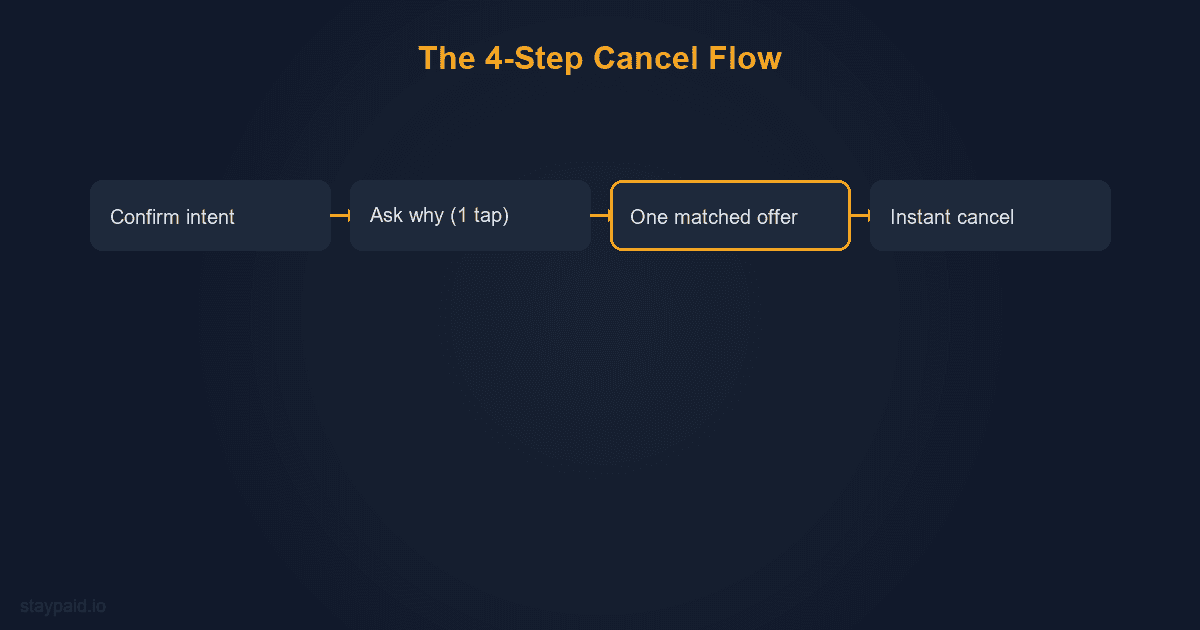
A subscription cancellation flow is the sequence of screens between 'I clicked cancel' and 'subscription ended'. A good one is four steps: confirm intent, ask why in one tap, show at most one matched save offer, then cancel instantly if the customer still wants out. Done right, it saves a meaningful share of would-be churn without crossing into dark-pattern territory.
Most founders build one of two extremes. Either cancel is a single instant button and every leaver is gone with zero data, or cancel is a maze of guilt screens and fake 'are you sure' dialogs that customers screenshot and post on social media. Both cost you. The first costs revenue, the second costs reputation and, increasingly, legal exposure.
The four-step flow that works
Here is the structure I would build from scratch today, in order.
- •Step 1, confirm intent. One clean screen: 'You're about to cancel. Here's what you'll lose.' List the top 2 or 3 things they actually use, not marketing copy. Two buttons: keep my subscription, continue to cancel. No tricks, both buttons the same visual weight.
- •Step 2, the one-question exit survey. A single question with 5 or 6 tap-to-select reasons, no required text field. This data is the entire payoff of the flow, and you need it even from customers who cancel anyway. I wrote a full breakdown of which questions work and what to do with the answers in the exit survey post.
- •Step 3, one matched save offer. Based on the reason they picked, show exactly one offer that addresses it. Pause for 'not using it right now'. Downgrade for 'more than I need'. Discount for 'too expensive'. Nothing, just a smooth exit, for 'switching to a competitor'. One offer, not a menu.
- •Step 4, instant cancel. If they decline the offer, cancel happens on the next click. No second survey, no 'speak to our team', no retention script. The customers you saved were saved at step 3. Everyone else wants out, and your job is a graceful exit they will remember when they come back.
Why matching the offer to the reason matters so much
A generic save offer converts poorly and costs you twice. Show a discount to someone who said 'not using it' and you either lose them anyway (they do not have a price problem) or you keep them at a discount while their usage stays at zero, which means they churn in two months at a lower price. You paid the discount and kept the churn.
Matching fixes this because cancellation reasons fall into predictable buckets, and each bucket has exactly one right answer. Timing problems get a pause. Price problems get a discount or downgrade conversation. Value problems get nothing, because a customer who found a competitor or outgrew the product is not saveable this quarter, and offering them money to stay is buying a delayed churn at a discount rate. The exit survey is what makes matching possible; without it you are offering blind.
The Stripe mechanics: period end vs immediate
On the billing side, the key decision is when cancellation takes effect. Stripe gives you both options. Setting cancel_at_period_end to true keeps the subscription active until the current paid period ends, then stops it. Canceling immediately ends it now, with proration behavior depending on your settings.
Default to period-end for self-serve cancellations. The customer paid for the month, they get the month. That is not generosity, it is what they expect, and the alternative generates 'I canceled and lost access instantly' support tickets and disputes. Period-end cancellation also creates a natural grace window: some customers hit cancel in a frustrated moment and quietly un-cancel a week later. Immediate cancellation removes that possibility.
One detail worth handling well: when you set cancel_at_period_end, tell the customer the exact date in plain language, in both the confirmation screen and the email. 'Your subscription ends on April 14' prevents the two classic tickets: 'did my cancel work?' and 'why was I charged after I canceled?' (they were not, the period just had not ended when they checked).
The legal lines you cannot cross
Cancellation flows are regulated now, and the direction everywhere is toward symmetry: canceling must be as easy as signing up. The practical rules to build by: the cancel button must be findable where customers manage billing, the flow cannot require a phone call or chat for a product bought online, save offers must be skippable, and the final cancel must work without retention intervention. I covered the specifics by jurisdiction in the subscription cancellation laws post; the short version is that one optional, skippable save screen is fine, and everything past that is risk.
The good news is that the legal floor and the conversion optimum are the same flow. Aggressive multi-screen retention mazes do not even work well; they produce angry customers who dispute charges instead of canceling, which is worse for you than a clean churn. Friendly fraud often starts as a customer who tried to cancel and got lost in the maze.
What happens after they cancel matters too
The confirmation email is the start of the win-back window, not the end of the relationship. It should confirm the cancel worked, state the access end date, explain what happens to their data, and include a one-click way back. No guilt, no 'we're sad to see you go' theatrics. Then, months later, that email address feeds your win-back campaigns, which convert far better than cold acquisition because the customer already knows the product.
Also: canceled customers are your most honest product feedback channel. The exit survey data, reviewed monthly, tells you exactly where the product or pricing is leaking. A cancellation flow is a retention tool and a research instrument at the same time. Founders who build it only to save customers miss half its value.
What a good flow looks like by the numbers
Set expectations before you measure. Of customers who enter a cancel flow, the large majority still cancel, and that is healthy: people who reach the flow mostly mean it. A well-matched save offer typically converts a minority of leavers, and even single-digit save rates are real money because the alternative was zero. The metrics that matter are save rate by offer type, 90-day survival of saved customers, and exit-reason distribution month over month. If saves look great but the saved churn at day 60, your offers are delaying, not saving, and the matching table needs work.
Watch for one perverse signal too: if total cancellations drop after you ship the flow but churn-reported revenue does not, you have made canceling harder instead of making leaving less attractive. That is the dark-pattern smell test, and it shows up later as disputes and chargebacks from customers who could not find the exit. A flow you are proud of shows up in save rates and survey data, not in a cancel button that is hard to find.
Before you build anything, quantify what voluntary churn costs you: the churn calculator turns your cancellation count into an annualized revenue figure, which is the number that justifies the engineering time. A cancel flow is a few days of work for most stacks; knowing it protects five figures a year is what gets it prioritized over the next feature.
And the churn you cannot save with a flow
Everything above is voluntary churn: customers who chose to leave. A cancellation flow does nothing for the other half of churn, the customers who leave by accident when a card expires or a payment fails. Those customers never see your cancel flow; they just quietly become delinquent while meaning to stay. That is the problem I built StayPaid for: smart retries and personal recovery emails from your own address, $29 a month flat. Build the flow for the customers who want to leave, and the recovery system for the ones who do not.
FAQ
What is a cancellation flow in SaaS?
The cancellation flow is the sequence of screens a customer goes through when they click cancel. A good one confirms intent, asks why in one tap, presents at most one matched save offer (pause, downgrade, or discount), and then lets the customer cancel instantly if they still want to. It is a retention tool, not a retention trap.
Is it legal to add steps before a customer can cancel?
It depends on the jurisdiction, and the trend is toward fewer allowed steps. The FTC's click-to-cancel rule in the US and similar EU rules require canceling to be as easy as signing up. One optional save screen is generally fine. Forced retention scripts, hidden cancel buttons, or requiring a phone call are not. When in doubt, make cancel one click past the optional offer.
Should the cancel flow offer a discount?
Only when the stated reason is price, and only once. A discount shown to every canceller trains your customer base to click cancel for a coupon. Match the offer to the exit-survey reason: pause for timing problems, downgrade for usage problems, discount for price problems, nothing for 'found a competitor'.
How do I cancel a Stripe subscription at period end vs immediately?
In Stripe, set cancel_at_period_end to true to let the customer keep access until the paid period ends, which is the right default for self-serve cancellations. Canceling immediately stops access and prorates based on your settings. Period-end cancellation gives the customer what they paid for and gives you a window where they might change their mind.
Keep reading
Robert
Founder at StayPaid
Want to recover failed payments like a founder?
Start Free — First 3 recoveries