Stripe Decline Codes Explained: Soft vs Hard Declines (and What to Do With Each)
Stripe decline codes explained: which are soft (retry) vs hard (email), and what to do with insufficient_funds, expired_card, and more.
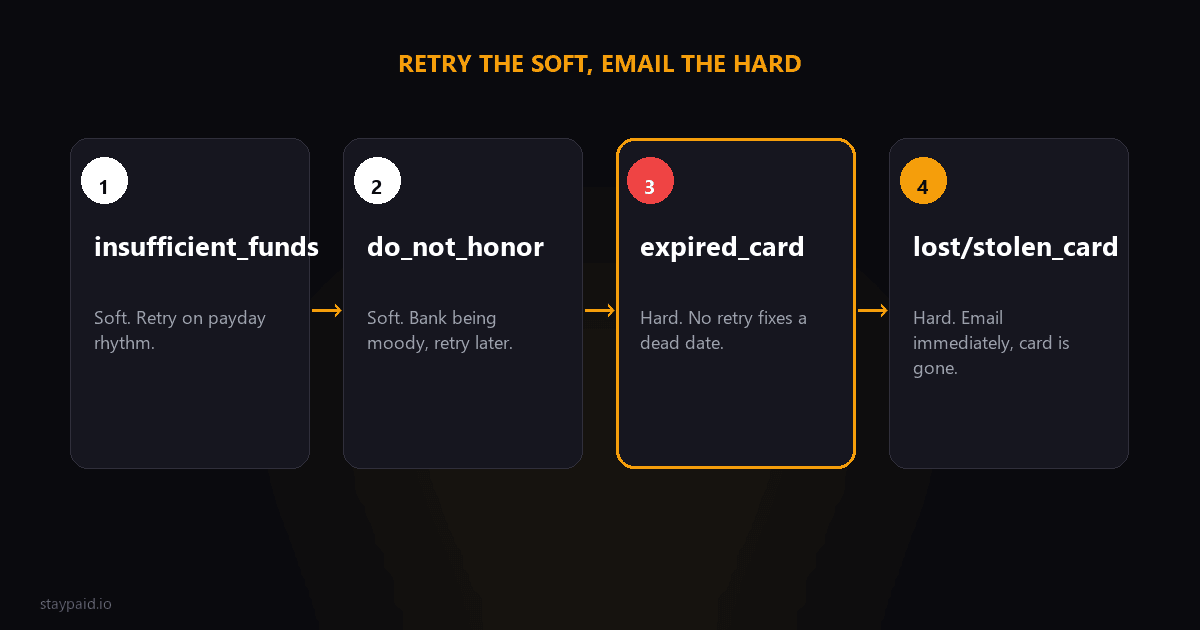
Every decline is either a timing problem or a dead-end
A soft decline means the charge can succeed later — the card is fine, the situation isn't. A hard decline means it can never succeed — the card is gone and only a new one fixes it. That one distinction tells you whether to retry or to email, and most recovery failures come from getting it backwards.
The top results on this topic are written for payment engineers, full of raw code names with no 'now what.' So here's the founder version: the codes that actually show up on subscription renewals, sorted into retry and email buckets.
How to read a decline code
When a Stripe charge fails, the failure carries a decline_code — a short machine name like insufficient_funds or expired_card. On a subscription, that same code determines whether Stripe's automatic retries can ever help or whether the customer needs to act. Learning to read it means you stop wasting retries on dead cards and stop missing the retries that would have worked.
The framing makes it easy. Think of soft as 'temporarily blocked' and hard as 'permanently invalid.' A soft decline is a money or timing situation that can change on its own. A hard decline is a fact about the card itself that won't change no matter how often you ask. Once you sort a code into one bucket, the right action follows almost automatically.
Soft declines: retry these
These are the timing problems. Something is temporarily wrong, and a retry on the right schedule will often clear it.
- •insufficient_funds — the card and account are valid, the balance isn't there yet. Retry on a spaced cadence near payday. This is the classic soft decline.
- •generic_decline — the bank declined without a specific reason. Often temporary and issuer side. A later retry often works; don't treat it as the customer's fault.
- •do_not_honor — the bank said no without explanation, frequently a cautious or temporary decline. Worth a retry, especially after a day or two.
- •authentication_required — the charge needs 3D Secure approval and nobody was there to give it. Retrying alone just re-hits the same wall; the customer has to act. It's special because it's fixable, but only through a human, so it needs the email treatment — I covered the whole SCA piece in /blog/3ds-authentication-failed-subscriptions.
The rule for soft declines: retry, but with timing, not brute force. Spacing attempts across days beats firing five in a row, because insufficient_funds clears on a payday cycle — hammering it in one afternoon is spamming a card that still doesn't have money on it. The single most common soft-decline mistake is retrying the right card at the wrong moment.
Hard declines: email these
These are the dead-ends. No amount of retrying will ever make them succeed, because the card itself is invalid. The only fix is a new payment method, which means it's now a communication problem.
- •expired_card — the card has passed its expiration date. Retrying is pointless; the customer must add the updated card.
- •lost_card — the card was reported lost. It's cancelled. Email now and ask for a replacement.
- •stolen_card — the card was reported stolen. Same deal: dead card, email immediately, new card required.
- •card_declined — a catch-all from the bank. It can be soft or hard depending on the issuer, so treat repeated failures as a reason to reach out rather than keep retrying.
For hard declines, the recovery email is the whole game. The customer often doesn't know their card expired or was cancelled — your note is the first they've heard of it. A clear, friendly 'your card on file stopped working, here's how to swap in a new one' email, from a real person, recovers a meaningful share of these before the subscription ever gets cancelled.
A useful habit: make the update path one click. Don't send a hard-decline customer to a settings maze; give them a link that drops them straight onto the payment screen. Every extra click between 'lost card' and 'new card saved' is a recovered customer you hand back to the void. Speed and simplicity are the whole strategy here.
The in-between: card_declined and other catch-alls
Not every code sorts cleanly into a bucket. empty_card and incorrect_cvc point to a data-entry problem the customer should fix. card_declined is a bank catch-all that can go either way. When the situation is ambiguous, the safe play is a short retry — one, maybe two — and if it fails again, treat it as needing a human email. One retry costs you nothing; an endless retry loop on an ambiguous decline costs you the customer.
The decision rule: retry the soft, email the hard
"Retry the soft, email the hard. Mixing them up is how you annoy banks with pointless retries and lose customers who never knew they had to act."
If you get this one rule right, you've done more than most custom retry setups. Soft declines get spaced-out retries on a sensible schedule. Hard declines get a fast, personal email instead of a doomed retry loop. And authentication_required sits in between — it's soft in the sense that the customer can fix it, but only by acting, so it needs the email treatment too. Once you've sorted codes into retry-versus-email, the rest is just discipline: schedule the retries and don't let the emails get lost in the noise.
Why the wrong response costs you
- •Retrying a lost card: every attempt is guaranteed to fail, it can look bad to the bank, and you've given the customer zero chance to fix it.
- •Emailing too late on a hard decline: the customer only finds out when their access is cut, which is the moment they're most likely to just cancel.
- •Emailing on a simple insufficient_funds: a mild annoyance, but it tells the customer about a problem that a retry would have silently solved.
- •Retrying insufficient_funds correctly: the charge clears on payday, nobody ever needed to lift a finger, and no churn happens at all.
Where to find your decline codes
In the Stripe dashboard, open any failed payment and the decline code sits right there in the payment details. If you want the bigger picture, filter your payments by failure and scan the codes across a month of renewals — most SaaS founders find two or three codes make up nearly all of their failures. That concentration is good news: you don't need a policy for forty codes, you need a policy for the three that actually show up.
If you're on Stripe Billing, the same codes appear on the failed invoice, and tools that listen to Stripe webhooks can route on them automatically — soft codes into the retry queue, hard codes into your inbox as 'email this person today.' The code is the routing slip. Everything else is just execution.
What this means for your setup
Any decent dunning setup, including Stripe's own Smart Retries, handles the 'when do I retry' part. What a retry loop can't tell you is the human half: which failures need a person to reach out and fix a card. That's where the decline code becomes a routing decision — retry the soft ones automatically, and flag the hard ones for a personal email within hours. The faster you act on the hard declines, the fewer customers you lose.
Start simple: for one billing cycle, watch which decline codes show up on your renewals and write down what you did in response. You'll almost certainly spot a pattern — cards dying quietly, balances clearing on payday — and that pattern tells you exactly where setup effort pays off. Most founders only need to automate the soft retries and discipline the hard-decline emails to see the leak stop.
This is exactly the split my own tool works around. StayPaid watches the decline codes on your renewals, lets the soft declines retry on smart timing, and surfaces the hard ones — the expired, lost, and stolen cards — as things a human should email about, from your own address with a personal note. The codes tell you what to do; acting on them fast is what keeps the customer.
Is my decline code soft or hard? The quick reference
This is the table people actually search for. If your code is in the soft column, smart retries recover a meaningful share without the customer doing anything. If it is in the hard column, every retry is wasted and the fix is a message to the customer.
- •insufficient_funds: soft. The classic retryable decline. Time retries around paydays and the recovery rate is the highest of any code.
- •card_velocity_exceeded: soft. The card hit a rate limit. Back off, wait hours not minutes, and retry with wider spacing.
- •processing_error: soft. A transient network or issuer hiccup. Retry freely.
- •issuer_not_available: soft. The bank's systems were down. Retry later the same day.
- •try_again_later: soft. Exactly what it says.
- •do_not_honor: hard-leaning. The bank declined with no reason and will keep declining until the customer calls them. Email, then retry after the customer acts.
- •generic_decline: hard-leaning. Same shape as do_not_honor.
- •expired_card: hard. No retry fixes an expired card. Email the customer for new details.
- •lost_card / stolen_card: hard. The card is dead permanently. Never retry; contact the customer.
- •fraudulent: hard. Do not retry. Ever.
When a code is genuinely ambiguous, treat the first failure as soft and the second as hard. One retry costs nothing; five retries against a dead card tell the card networks you are not paying attention, and that reputation follows your merchant account.
FAQ
What does do_not_honor mean on a Stripe charge?
It's a soft decline that means the bank declined the charge without giving a specific reason — often just being cautious or having a temporary hold. A retry later, especially close to a payday, frequently succeeds. It's not a card problem you can fix by asking the customer to update details.
Is an insufficient funds decline soft or hard?
It's a soft decline. The card and the account exist; they just don't have a high enough balance right now. Retrying on the right timing — aligned with a payday cycle — is exactly what works here. Pounding it five times in a day is how you both annoy the bank and get nothing.
Should I retry a lost_card or stolen_card decline?
No. Those are hard declines — the card is dead. No retry will ever make them succeed. The only move is to email the customer immediately, tell them the old card won't work, and give them a fast way to add a new one.
How long should I wait before retrying an insufficient_funds decline?
There's no one right answer, but don't retry in the same day. Spread attempts across roughly a week to ten days so you line up with common payday cycles. A spaced-out cadence of a few attempts beats a burst of many, because the balance often clears on payday.
Keep reading
Robert
Founder at StayPaid
Want to recover failed payments like a founder?
Start Free — First 3 recoveries