The SaaS Dunning Process, Step by Step (2026 Playbook)
The full SaaS dunning process: pre-dunning, failure detection, email timing (day 1/3/7/14), and the metrics that matter. Step-by-step playbook.
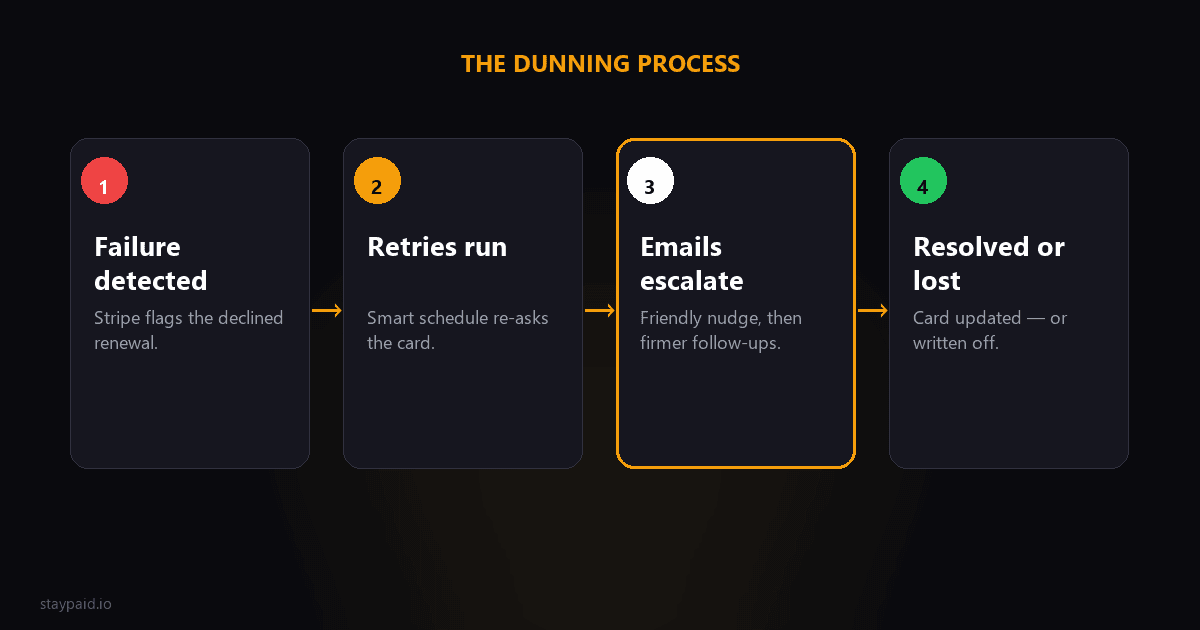
Here's what nobody tells you about the SaaS dunning process: it's not about sending more emails. It's about sending the right emails at the right time, with a specific goal for each one.
What is the SaaS dunning process?
The SaaS dunning process is the step-by-step system you put in place from the moment a subscription payment fails to the moment you either recover the payment or gracefully part ways. A well-designed process recovers 50–70% of failed payments before they become lost revenue.
Everything you read about dunning online right now was written for accounts receivable departments. Invoice-based dunning. Collections dunning. None of it maps cleanly to subscription billing, where a card that worked yesterday stops working today and the customer may not even know.
The five stages of a dunning process
A complete dunning process has five stages, and they happen in order. Skipping one means leaving recoverable revenue on the table.
- •Pre-dunning — catch problems before they fail
- •Failure detection — know what happened and why
- •Retry timing — let Stripe's Smart Retries do the first pass
- •Email sequence — the human recovery emails (this is where most of the work lives)
- •Resolution — either payment recovered or access revoked
I'm going to spend most of our time on stage four because that's where the process either works or doesn't.
Stage 1: Pre-dunning
Pre-dunning means catching the problem before Stripe even sends an invoice.payment_failed webhook. The most common cause of failed payments is expired cards. If you can prompt the customer to update their card 30 days before it expires, you avoid the failure entirely.
Stripe sends no automatic card-expiry warning. You have to build this yourself or use a tool that does. A single pre-dunning email that says "your card on file expires next month" can prevent 15–20% of your monthly failures before they happen.
Stage 2: Failure detection
When a payment fails, Stripe sends the invoice.payment_failed webhook. Inside that payload is a failure_code — generic_decline, expired_card, insufficient_funds, stolen_card, and a few others. You need to actually read this code and route the response accordingly.
A stolen_card code means stop immediately and don't email the customer. An expired_card means they likely want to pay but forgot to update. An insufficient_funds code might suggest trying again in a few days. Different codes, different responses.
Stage 3: Retry timing
Stripe Smart Retries will automatically retry failed charges on an escalating schedule — typically 3, 7, 12, and 24 hours after the failure. The retry logic checks with the card network to see when another attempt might succeed and schedules accordingly.
Let Smart Retries do its thing. Don't send a customer email during this window. If a retry works, the customer never needs to know there was a problem. A dunning email that arrives after a successful retry is confusing and erodes trust.
If all Smart Retries fail — typically within 24 to 48 hours — the payment is genuinely stuck and it's time for the human sequence.
Stage 4: The email sequence timeline
This is the centerpiece of your dunning process. The timing matters almost as much as the words. Here's the cadence I've landed on after working through thousands of failed payments:
Day 1 — The notification email
Send this immediately after Smart Retries exhaust themselves, roughly 24–48 hours after the initial failure. The goal is simple: let the customer know what happened and give them an easy way to fix it.
This email should do three things:
- •State the problem plainly — "your payment didn't go through" — without blame or alarm
- •Assume good intent — mention expired card or bank hold as the likely cause, not declined card or insufficient funds
- •Give one CTA — a direct link to the Stripe Customer Portal or billing page where they can update their card in under 30 seconds
What this email should NOT do: threaten cancellation, mention late fees, or ask them to call support. Those belong much later in the process, if at all. The customer probably doesn't even know their card expired.
Day 3 — The value reminder email
Day 3 is where most generic dunning processes stop — one email, then silence. But if the customer didn't respond to day 1, they either missed it or decided the service wasn't worth the effort of updating their card. Day 3 addresses the second possibility.
This email should do three different things:
- •Remind them what they use — mention a specific feature or report they use regularly, not just their plan name
- •Signal that access continues — no threats, just a heads-up that their account is still running
- •Repeat the CTA — same billing link, same short path to fix it
The shift in framing from day 1 is subtle but important. Day 1 says "something happened." Day 3 says "we want you to stay." Customers pick up on the difference.
"The best dunning sequences don't escalate in urgency. They escalate in care. The first email informs. The second reminds you what you'll miss. The third offers help. The fourth is a graceful goodbye."
Day 7 — The help offer email
By day 7, the customer has had a week of full access. Most dunning processes at this point switch to threats. I think that's a mistake. Instead, this email should offer help.
This email should do three things:
- •Offer alternative payment methods — some customers may want to switch from card to manual invoicing
- •Open a direct reply line — "just hit reply if there's anything I can help with" — and actually mean it
- •Mention the consequence softly — "I'll need to pause your account on day 14 if we can't sort it out" — once, not screamed
Day 7 is often where the recovery happens for customers who genuinely wanted to pay but needed more time or a different method. The offer of help — not a threat — is what gets them to respond.
Day 14 — The graceful goodbye email
Day 14 is the final email. The tone here is warm but clear. Don't ghost the customer — give them one last chance while making it clear that access is about to change.
This email should do three things:
- •State the action clearly — "I've paused your subscription to avoid further failed charges" — note paused, not cancelled
- •Keep the door open — "if you update your card, your account turns right back on"
- •Include a pause churn offer — downgrade to a free tier, offer a deeply discounted rate, or let them export their data
The word paused matters. Cancelled feels final. Paused implies a path back. Many customers come back weeks or months later when their situation changes.
Stage 5: Resolution
If the customer updates their card at any point during the sequence, immediately stop all emails and confirm the payment went through. If day 14 passes with no response, pause the subscription — don't cancel it — and move them to your churn-retention workflow.
Keep their data for at least 90 days. I've seen customers come back after two months, pay the outstanding invoice, and pick up right where they left off.
Metrics that tell you if your process is working
There are three numbers I track every week:
- •Recovery rate — the percentage of failed payments that eventually succeed. A healthy process recovers 50–70%. Below 40% means something in your sequence needs fixing.
- •Time to recover — the average number of days between first failure and successful recovery. If this is over 10 days, your day 1 or day 3 email isn't working.
- •Email-level conversion — what fraction of recovered payments happen after each email touch. If day 7 recovers nothing, change day 7. If day 1 recovers 80%, your sequence may be too front-loaded.
I track these in a simple spreadsheet. StayPaid surfaces them automatically too, but the important thing is to look at them regularly and tweak based on what the data tells you.
Should you automate the dunning process?
Yes, with one important caveat: automation should handle the timing and delivery, but the emails themselves should feel human. That's the gap I built StayPaid to fill — automating the process while keeping you in the loop to review each email before it goes out and add a personal note where it matters.
Full robotic automation — same template to every customer, no human review — typically recovers 10–15% fewer payments than a process with a human touch. The difference is in emails that feel specific rather than sprayed.
The whole process, simplified
Here's everything in one checklist you can implement this week:
- •Set up pre-dunning for cards expiring next month
- •Read failure codes from Stripe webhooks and route responses
- •Let Smart Retries run before any customer contact
- •Send day 1: notification email with one clear CTA
- •Send day 3: value reminder email focused on what they use
- •Send day 7: help offer email with a direct reply line
- •Send day 14: graceful goodbye email — pause, don't cancel
- •Track recovery rate and time-to-recover weekly
That's the SaaS dunning process. Not complicated. Not robotic. Just a thoughtful sequence of touches timed around how real people deal with billing problems. Most founders skip the sequence entirely and lose 30–50% of recoverable revenue every month. The ones who build this process keep it.
FAQ
What is the dunning process in SaaS?
The dunning process is the series of steps a SaaS company takes when a subscription payment fails: detect the failure, retry the charge on a schedule, notify the customer, and either recover the payment or gracefully cancel access. A good process recovers 50–70% of failed payments.
How many dunning emails should I send?
Most successful SaaS dunning sequences send 3–4 emails over roughly 14 days. Fewer leaves money on the table. More risks annoying the customer. The best cadence is day 1 (immediate), day 3, day 7, and day 14 (final).
Should I let customers keep using my product during dunning?
Typically yes, for at least the first week. Blocking access immediately creates urgency but also resentment. A common approach is to keep full access for 7 days, then degrade to read-only until payment is resolved.
What's the difference between dunning and collections?
Dunning is the polite, automated process of notifying a customer about a failed payment and asking them to update their billing info. Collections is the formal, often manual process of pursuing unpaid debts. In SaaS, dunning comes first and recovers most payments before collections is ever needed.
Keep reading
Robert
Founder at StayPaid
Want to recover failed payments like a founder?
Start Free — First 3 recoveries