"Your Card Does Not Support This Type of Purchase" on Stripe: Causes and Fixes
The Stripe "card not supported" error decoded: which card restrictions cause it, why retries fail, and the fastest paths to getting paid.
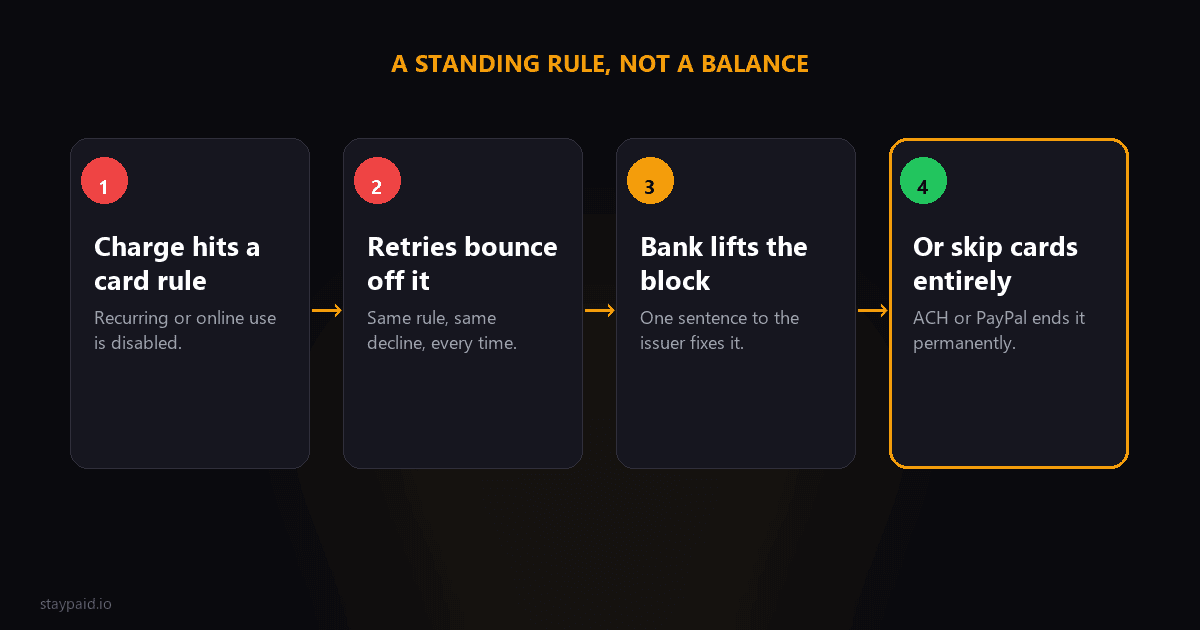
"Your card does not support this type of purchase" means the card has a standing rule against your kind of transaction. It is a hard decline: the money can be sitting right there and the charge still fails, because the card's own rules forbid it. Retrying changes nothing.
If you searched this exact error string, you are probably holding a failed payment right now, either as a founder watching a renewal bounce or as a customer confused at a checkout. This post covers both sides: what causes it, and the fastest way through it.
The four restrictions behind this error
"This type of purchase" sounds mysterious, but it almost always means one of four things:
- •Card-not-present disabled. The card is blocked from online and phone transactions entirely. Common on debit cards from conservative banks and on cards the customer once locked down after a fraud scare.
- •Recurring charges blocked. Some prepaid cards and some corporate cards explicitly disallow recurring billing. The first charge might go through (it looks like a one-off), then every renewal fails with this error.
- •Cross-border block. Your Stripe account settles in a different country than the card's issuing bank, and the card is restricted to domestic transactions. If you sell internationally from a US or EU entity, you see this constantly.
- •Merchant category or network rules. The card brand or issuer bars your merchant category code on that card product. Prepaid cards blocking subscriptions and corporate cards limited to travel and supplies are the usual suspects.
The tell that separates this from other declines: the same card often works fine elsewhere. The customer bought groceries with it an hour ago. That is because restrictions are specific to transaction type, not the card's overall health.
Why you cannot retry your way out
Founders burn real money learning this. A retry hits the same standing rule and returns the same decline, and every attempt counts against the card networks' retry limits (roughly 15 per 30 days on Visa, about 35 on Mastercard). Worse, a burst of identical failed attempts can make the issuer's fraud model warier of your merchant descriptor generally.
So the rule is simple: card_not_supported goes straight to the customer-contact path. No retry sequence, no waiting for a better day. The restriction lifts when the customer acts, and not a minute before.
The fix, for the customer
If this is your card failing, here is the two-minute version. Open your bank's app or call the number on the card and say: "I need online and recurring transactions enabled on this card, and if the merchant is international, cross-border transactions too." That sentence covers three of the four causes. If the card turns out to be prepaid or corporate with a fixed policy, skip the call and use a different card, because that policy will not move.
The fix, for the founder
Your email for this decline has one job: tell the customer it is a card rule, not a balance issue, and hand them the sentence to say to their bank. Something like:
"Your payment didn't go through, and it's not about funds: your card has a block on this type of purchase (usually online or recurring charges are disabled on the card). Your bank can lift it in a couple of minutes if you ask them to enable online/recurring transactions. Or if it's easier, a different card works right away: [link]"
Then give them an escape route that skips the card problem entirely. If you can offer ACH/bank debit or PayPal as a backup for these customers, do it. A customer whose card policy blocks SaaS subscriptions will never stay recovered on cards; they will fail again next year when the replacement card inherits the same corporate policy. One ACH mandate and the problem is permanently solved.
The pattern to watch in your own data
Pull your declines by code and country. If card_not_supported clusters in a specific region, you have a cross-border problem, and the systemic fix is localizing your entity or payment methods for that market, not emailing customers one by one forever. If it clusters on signups from a particular channel (hello, prepaid-heavy audiences), consider whether your checkout should warn earlier.
What you can change at checkout to see less of this
Most of this post is about recovering the payment after the error. But a founder can also reduce how often it happens in the first place. A few levers, in order of effort:
- •Offer more than cards. Adding ACH for US customers, SEPA for EU customers, or PayPal as an alternative gives every card-policy-blocked customer an immediate second path. This is the single biggest reduction lever for this error.
- •Localize currency and entity over time. Cross-border blocks shrink when you bill customers in their own currency from a closer entity. That is a bigger project, but if a region clusters this error, it pays for itself.
- •Watch your merchant category code. If your MCC is miscoded into a category banks dislike, whole card portfolios will decline you. Your processor can confirm what you are coded as; a wrong code is fixable and sometimes explains a mysterious cluster.
- •Let customers add a backup card. A saved second card turns a hard decline into a silent recovery, because the retry against card number two never hits the restriction at all.
None of these eliminate the error; card policies will always exist. But each one shrinks the pool of customers who ever need the recovery email, which is the cheapest outcome of all.
One confusion to avoid
Founders mix this error up with two neighbors, and the fix differs for each. If the message says insufficient funds, the card type is fine and the money is not there; that is a timing problem solved by payday-aware retries. If the failure is a 3D Secure authentication prompt that never completed, that is an authentication problem, not a card-policy one, and the customer just needs to approve the prompt. Card not supported is the one where the card's own rules forbid the transaction type, full stop. Read the actual decline code in Stripe before choosing the play; the customer-facing error strings all blur together, but the codes do not.
If you are the customer who hit this at checkout and just want it solved: skip the mystery and call your bank. Say the merchant name, say it is an online recurring charge, and ask them to allow it. Two minutes, and it beats re-entering the same card four times while the error string glares at you.
And if you see this error in bursts rather than singles, check the obvious systemic suspects first: a new card-on-file flow that saves the wrong funding type, a pricing change that moved you into a blocked merchant category, or a wave of signups from a region whose banks default-deny cross-border. One customer with this error is an email. Fifty is a configuration problem.
This is the part of payment recovery nobody screenshots for Twitter: reading your decline codes like a diagnostic instead of a tragedy. Every code is the bank telling you which play to run. This one's play is "stop retrying, send a human email, offer a non-card path." I built StayPaid to run exactly those plays automatically, from your real email address, so a standing card rule turns into a recovered customer instead of a silent cancellation.
FAQ
What does "your card does not support this type of purchase" mean on Stripe?
The card itself is restricted from your type of transaction. Usually that means online purchases are disabled on the card, the card brand blocks your merchant category, or the card does not support cross-border or recurring charges. The money may be there; the card's rules are the problem.
Is card_not_supported a hard or soft decline?
Hard. Retrying the same card for the same type of charge will keep failing because the restriction is a standing rule on the card, not a temporary state. The fix is the customer enabling that transaction type with their bank, or paying with a different card or method.
How do I fix a card not supported error as a customer?
Call your bank (or open their app) and ask them to enable online, recurring, or international transactions on the card, whichever applies. If the card is a corporate or prepaid card with a fixed policy, use a different card instead. It takes minutes once you know what to ask for.
Why does the same card work elsewhere but not on my Stripe checkout?
Because restrictions are transaction-type specific. A card can be enabled for in-store purchases but blocked for card-not-present charges, or allowed domestically but blocked cross-border. Your charge may fall into a category the card is barred from even though everyday spending works fine.
Keep reading
Robert
Founder at StayPaid
Want to recover failed payments like a founder?
Start Free — First 3 recoveries