Stripe Dunning: The Complete Guide for SaaS Founders
Stripe dunning explained for SaaS founders: free tools, limits, and a proven recovery workflow.
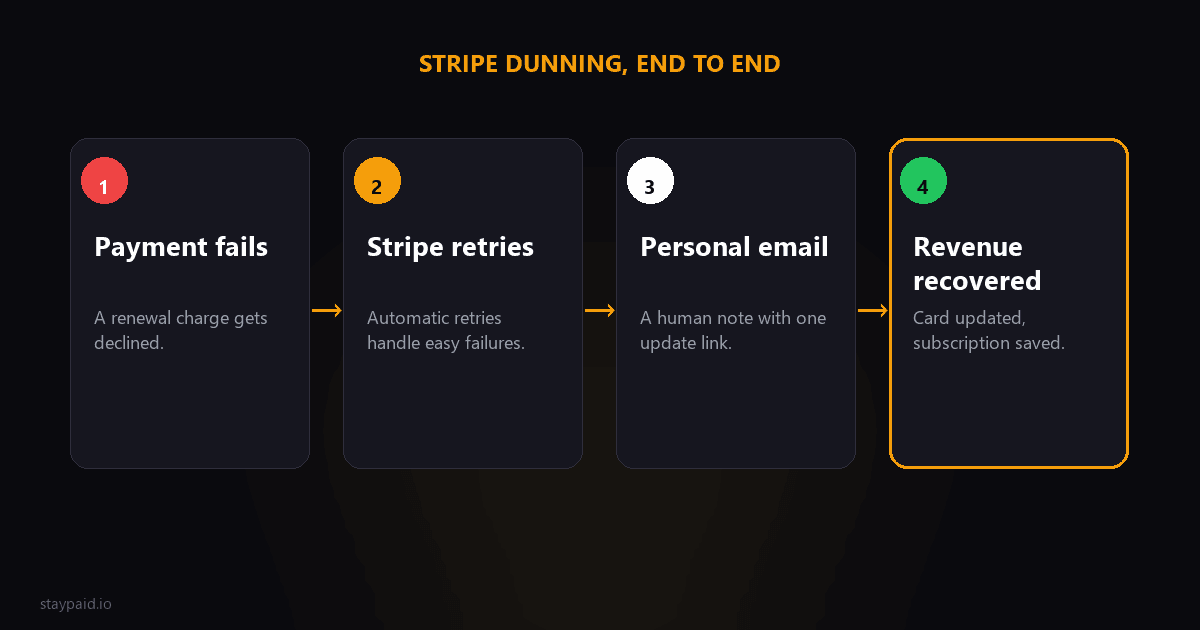
What is Stripe dunning?
Stripe dunning is the process that runs after a subscription payment fails. When Stripe tries to charge a customer's card and the bank declines it, dunning encompasses everything that follows: automatic retries, email notifications, card updater signals, and eventually the subscription going past_due. Most founders encounter dunning for the first time when they notice a customer churning despite having an active card on file — the payment failed, Stripe retried, and nobody told them.
That gap between "Stripe tried" and "the customer left" is where involuntary churn lives. Involuntary churn — churn caused by payment failures, not by customers intentionally canceling — accounts for a meaningful share of total churn for many SaaS companies, especially ones selling to consumers or SMBs where card expiry and bank declines are common. And it's largely recoverable if you catch it in time.
Understanding dunning means understanding what happens at each stage of a failed payment: the initial attempt, the bank's decline response, Stripe's retry logic, the notification the customer receives, and what happens when all of those fail. Most of this happens automatically inside Stripe. The gap is what happens — or doesn't happen — after Stripe finishes its automated sequence.
What Stripe gives you for free
Stripe includes several dunning features out of the box. They're useful, and you should absolutely keep them enabled. But they solve only part of the problem. Here's what you get:
Smart Retries
When a card is declined, Stripe doesn't just try once and give up. Its Smart Retry system retries the payment at opportune times based on machine learning models trained on bank behavior and card network data. Depending on the decline code, Stripe may retry up to 30 times over several days, spacing retries further apart over time. This works well for transient declines — cards that are temporarily over limits or banks that are being cautious — but it does not help when the card is permanently dead. The decline code Stripe receives from the bank tells you what kind of failure you're dealing with: a generic_decline often recovers on the next retry, an expired_card or lost_card will not, and an insufficient_funds decline might resolve after payday. Stripe handles the retry timing automatically, but you'll want to know which codes are recoverable and which ones need a human email immediately.
Failed payment receipt emails
By default, Stripe sends an email to the customer when a payment fails. The email includes the invoice details and a link to update payment information. It's functional. It also sounds like it was written by Stripe's legal team. Customers receive dozens of these from various services and have learned to ignore them. The open rate on Stripe's default email is typically much lower than a personal message from a founder. The bigger issue is that Stripe only sends one email. After that, the ball is in the customer's court. If they miss it, the subscription goes to past_due with no further notification. There is no day 2 follow-up, no day 7 check-in, and no escalation to you when a high-value customer's payment has been failing for a week.
Customer Portal
Stripe's Customer Portal lets customers update their payment method, view invoices, and manage their subscription without bothering you. It's a good safety net. If a customer clicks through from a failed-payment email and updates their card, the portal handles everything. But the portal is passive — customers need to reach it first, and the default email doesn't always compel that visit. The portal also requires you to configure it: you need to set up a session link and embed it in your app or emails. Many founders skip this step and lose the easy self-serve path for customers who would happily update their card if they knew where to go.
Where Stripe's built-in tools stop
Stripe's free tools handle the automatic part of dunning well. The problem is the part that requires a human touch. Here's where they fall short:
- •Stripe cannot detect a dead card until it tries to charge it. Expired cards, lost cards, and cards replaced after a bank reissue sit silently until the next billing cycle triggers a failure.
- •The default email sequence is a single touch. After the initial failed-payment email, Stripe sends no follow-up sequence. If the customer ignores it, the subscription silently slides toward cancellation.
- •Smart Retries eventually exhaust themselves. After the last retry fails, Stripe stops trying and moves the subscription to past_due. No alert is sent to you, the founder.
- •There is no personalized messaging. Every customer gets the same email, written in Stripe's voice, regardless of their relationship with your product.
The recovery workflow that fills the gap
The workflow I recommend balances persistence with respect. Too many emails feel aggressive. Too few feel careless. A cadence of four touches over two weeks — each with a different goal — gives the customer room to respond without forgetting about the payment.
Day 1: The immediate recovery email
Send this within a few hours of the failed payment. The goal is speed and clarity. Assume the card declined for a benign reason — expired card, bank fraud check, insufficient funds. Open with a plain heads-up, include one link to update billing, and sign off with your name. No urgency. No threats. Just a real person saying "hey, this didn't go through, here's how to fix it."
Day 3: Gentle reminder
If the customer hasn't updated their card after three days, send a shorter follow-up. The tone should stay friendly. Acknowledge that they might have missed the first email. Offer to help if they ran into an issue. This is the email where you can offer to hop on a support chat if something is blocking them from updating payment.
Day 7: Value reminder
At the one-week mark, the customer has likely seen your previous emails and hasn't acted. Instead of repeating yourself, shift the focus. Remind them of what they're getting from your product — the reports they run, the automations they've set up, the data they'd lose. Frame the payment update as protecting access, not settling a debt.
Day 14: Final notice
Two weeks is the threshold. By now the subscription is probably in past_due status and Stripe has exhausted its retries. This email should be direct without being aggressive. State the consequences clearly — access will be suspended, data may be archived — and give one last link to update billing. After this, gracefully pause or cancel the subscription and stop emailing.
A few timing notes on this workflow. Send the first email within hours, not days — the closer to the failed payment, the more likely the customer knows what went wrong. Always stop emailing immediately if the customer updates their card, replies to any email, or asks for help. Never send the full sequence to someone who has already fixed the issue. And if you're using invoice.payment_failed webhooks, have your recovery system fire the day 1 email automatically — manual triage is fine at first, but it doesn't scale past a handful of customers.
Stripe settings checklist for better dunning
Before you build a recovery workflow, make sure your Stripe settings aren't working against you. Here's what to check:
- •Enable Smart Retries. Go to Billing > Emails in your Stripe dashboard and make sure Smart Retries is on. Stripe turns this on by default, but verify it is still enabled.
- •Set your past_due period. In Billing > Subscriptions > Settings, choose how long a subscription remains active after a failed payment. I recommend 14 days to give your recovery sequence time to work.
- •Disable automatic email receipts (optional). Stripe sends its own failed-payment email by default. If you're sending your own sequence, disable the Stripe email to avoid confusing the customer with two messages.
- •Configure webhooks. Set up the invoice.payment_failed and customer.subscription.updated webhook events in your Stripe dashboard. These fire the moment a payment fails so your recovery sequence starts immediately.
- •Enable the Customer Portal. Let customers who want to act early update their card on their own. The portal handles them without any intervention from you.
A tool like StayPaid can wire all of this together for you — listen for invoice.payment_failed webhooks, send your personalized day 1/3/7/14 sequence, stop automatically when the customer pays, and alert you only when a customer needs a real human reply. The workflow described in this guide is exactly what StayPaid was built to automate, but you can run it manually too with Stripe webhooks and a Gmail drafts folder. The key insight is this: Stripe handles the retries. You handle the relationship. The two together recover far more payments than either one alone. And the handful that slip through both — dead cards with unresponsive customers — are the ones you write off, not the ones you lose sleep over.
FAQ
What is Stripe dunning?
Stripe dunning is the automated process of retrying failed subscription payments and notifying customers when their card is declined. Stripe handles the technical retry logic and sends basic email notifications, but it does not include personalized follow-up emails or a multi-touch recovery sequence.
Does Stripe have built-in dunning?
Yes. Stripe provides Smart Retries, automated failed-payment email receipts, and a Customer Portal where customers can update their card details. These cover the basics but stop short of a full recovery workflow — there are no personalized emails, no multi-touch sequences, and no way to notify the founder when a customer needs individual follow-up.
How many times does Stripe retry a failed payment?
Stripe's Smart Retry system attempts a failed payment up to 30 times over several days, using machine learning to pick optimal retry timing based on bank patterns and card network rules. However, retries are ineffective against truly dead cards — cards that have expired, been reported lost, or been replaced.
What happens when all Stripe retries fail?
After Stripe exhausts its retries, the subscription transitions to past_due and eventually to unpaid or canceled, depending on your settings. No further notification is sent to the customer. At this point the recovery responsibility shifts to you — and the sooner you follow up personally, the more likely you are to recover the payment.
Keep reading
Robert
Founder at StayPaid
Want to recover failed payments like a founder?
Start Free — First 3 recoveries