Card Velocity Exceeded: What It Means and Why Your Retries Might Be Causing It
Card velocity exceeded explained: the bank limits behind it, when it resets, and how aggressive retry loops make it worse instead of better.
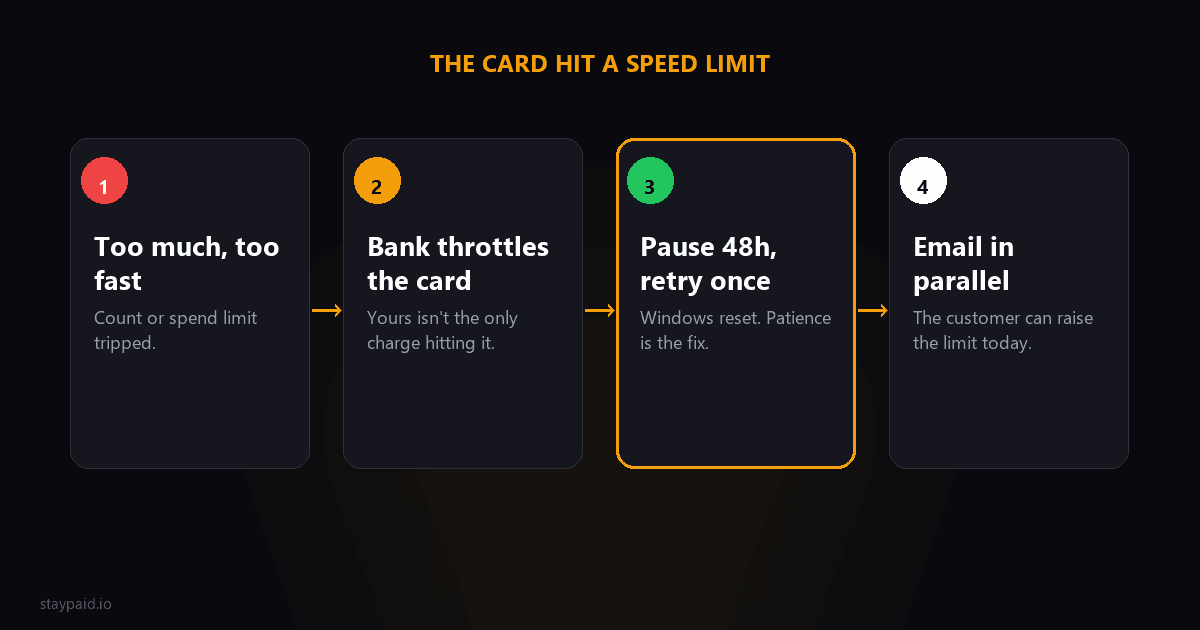
Card velocity exceeded means the customer's bank has throttled the card: too many transactions or too much spend inside a time window. The card hit a speed limit. Whether a retry works depends entirely on which limit it hit and when that limit resets.
This is a rarer decline code than insufficient funds or do_not_honor, but it is the most misunderstood one, for one reason: your own recovery attempts can cause it. More on that in a minute, because it changes how you should run your whole retry cadence.
What limit did the card actually hit
"Velocity" is issuer-speak for a family of limits, and they reset on different clocks:
- •Transaction count limits. A maximum number of charges per day or per week. Common on newly issued cards, debit cards, and corporate cards. Resets when the window resets.
- •Spending amount limits. A cap on total dollars per day, week, or month. The customer's card can be "healthy" and still decline your $99 renewal because a big purchase ate the month's headroom yesterday.
- •Rapid-activity throttles. Too many transactions in quick succession trips a fraud-adjacent brake, even if each one is small. This is the one your retry loop can trigger.
- •Category velocity rules. Stricter limits on specific merchant types the bank considers risky, regardless of the card's overall limits.
The customer rarely knows any of these exist. From their side, the card just stopped working for your charge specifically, which is why this decline confuses everyone involved.
The uncomfortable part: your retries count
Here is the angle most coverage of this code misses. When your billing system retries a failed charge five times in a day, those are five authorization attempts hitting the issuer in rapid succession. At some banks, that activity itself feeds the velocity counters and the fraud models. Your recovery attempt becomes part of the reason the card is throttled.
Separately, and this applies to every decline code: the card networks cap total retry attempts. Visa allows roughly 15 in 30 days and Mastercard about 35, with fines for merchants who blow past. A panicky same-day retry burst is not just useless, it spends a finite resource.
The discipline that avoids all of this: never retry more than once a day, space attempts across a week to ten days, and cap the total at a handful. If a payment is going to recover via retry, it almost always does so within 3 to 5 spaced attempts. Attempts 8 through 15 are where velocity problems and network fines live.
The playbook for this specific code
When a renewal fails with card_velocity_exceeded:
- •Stop all retry activity on that card for at least 48 hours. Whatever window tripped, give it room to reset. More attempts right now make it worse.
- •Send the email early, in parallel, not after retries run out. This is one of the few codes where the customer can genuinely speed things up, so tell them on day one or two.
- •Retry once after 2 to 3 days. If it succeeds, done. Daily-window limit confirmed.
- •If that retry fails, assume a monthly cap. Switch fully to the customer path: different card, or retry at the start of their next billing month.
What to say to the customer
The email needs to explain the situation in plain terms, because the customer's mental model is broken: they have money, the card works at stores, and your charge keeps failing. Try:
"Your bank is throttling the card: it hit a usage limit (too many transactions or too much spend in a set period), so our renewal can't go through right now. Two easy fixes: we can retry in a few days once the limit resets, or if you call your bank they'll tell you exactly which limit it hit and can often raise it on the spot. A different card also works immediately: [link]"
Notice what that does: it names the real cause, it sets the expectation that waiting is a valid path, and it keeps the instant option open. The worst emails for this code are the ones that scream urgency, because urgency pushes the customer to re-try the same card in your billing portal four times in an hour, which, you guessed it, feeds the velocity limit.
How to spot a velocity problem in your own data
You can diagnose whether your retry behavior is feeding velocity declines with one simple look: pull your failed charges and check the time gaps between consecutive attempts on the same card. If you see clusters of attempts minutes or hours apart, you are running the pattern that trips rapid-activity throttles. If attempts are spaced days apart and velocity declines still appear, the cause is on the customer's side (their other spending), and the email path matters more than the retry path.
Also watch for velocity declines that arrive right after a big retry batch. If you run retries in bulk, say every Monday at 9am, a customer with three failed subscriptions to different services all retrying at once can get throttled by the sheer volume of authorization attempts hitting their card in the same hour. It is nobody's fault and everybody's problem, and the fix on your side is simply not adding to the pile: one attempt, spaced well, then patience.
A note for the customer who landed here
If you are the cardholder staring at this error, the fastest path is boring but reliable: call the number on the back of the card and ask two questions. "Did my card hit a transaction or spending limit?" and "When does that limit reset?" The bank will tell you immediately, and they can often raise the limit on the spot or confirm the exact day it clears. That two-minute call replaces days of guessing, for both you and whoever you are trying to pay.
One more scenario worth naming: usage-based and high-frequency billing. If your product charges customers multiple times a month, or you run metered billing with frequent small invoices, velocity limits hit you far more often than they hit a simple monthly subscription. If that is your model, consolidating charges (weekly or monthly rollup invoices instead of per-event charges) reduces decline volume and velocity trips at the same time.
The bigger lesson
Card velocity exceeded is the code that teaches you payment recovery is not about retrying harder. It is about timing, spacing, and knowing when the only useful move is a human conversation. Every failed payment has a correct play, and for this one the correct play is mostly patience plus one good email.
Worth saying plainly: this code is rare enough that you should never redesign your billing around it, and common enough that your recovery flow should know it exists. One good email template and a 48-hour pause rule covers it forever. File it under solved and spend your energy on the codes that actually move your churn number.
That philosophy is literally why I built StayPaid: sane retry cadences that respect network limits, emails that go out from your real address at the right moment in the sequence, and no brute-force loops that turn a small problem into a throttled card. Recovery should feel like a founder who noticed, not a robot that panicked.
FAQ
What does card velocity exceeded mean?
The card has hit a usage limit set by its issuing bank: too many transactions, or too much total spend, within a set time window like a day or month. It is the bank throttling the card, not Stripe. Some velocity declines reset when the window resets; others need the customer to call their bank.
Is card_velocity_exceeded a soft or hard decline?
It depends on which limit was hit. If the customer blew through a daily transaction count, it is effectively soft: the window resets and a retry tomorrow can succeed. If they hit a monthly spending cap, it is hard for the rest of that month and they need a different card or a call to the bank.
Can my retry attempts cause a velocity decline?
Yes. If you hammer a card with repeated charge attempts in a short window, those attempts themselves count toward velocity limits at some issuers, and they certainly count toward the card networks' retry caps (roughly 15 per 30 days on Visa, about 35 on Mastercard). Aggressive retry loops can turn a recoverable decline into a velocity problem.
How long should I wait before retrying a velocity decline?
At minimum, past the likely window: 24 to 48 hours for daily limits, and do not bother retrying a monthly-limit case until the next billing month. When in doubt, space retries days apart and let an email to the customer run in parallel.
Keep reading
Robert
Founder at StayPaid
Want to recover failed payments like a founder?
Start Free — First 3 recoveries